
Mastering Elasticsearch Architecture: A Beginner's Guide
Elasticsearch is a distributed, real-time search and analytics engine built on Apache Lucene. To design robust, scalable search solutions, you need to understand its core building blocks: clusters, nodes, indices, documents, shards, and replicas. This guide briefly explains each component, how they interact, and practical best practices for production systems.
Core Concepts
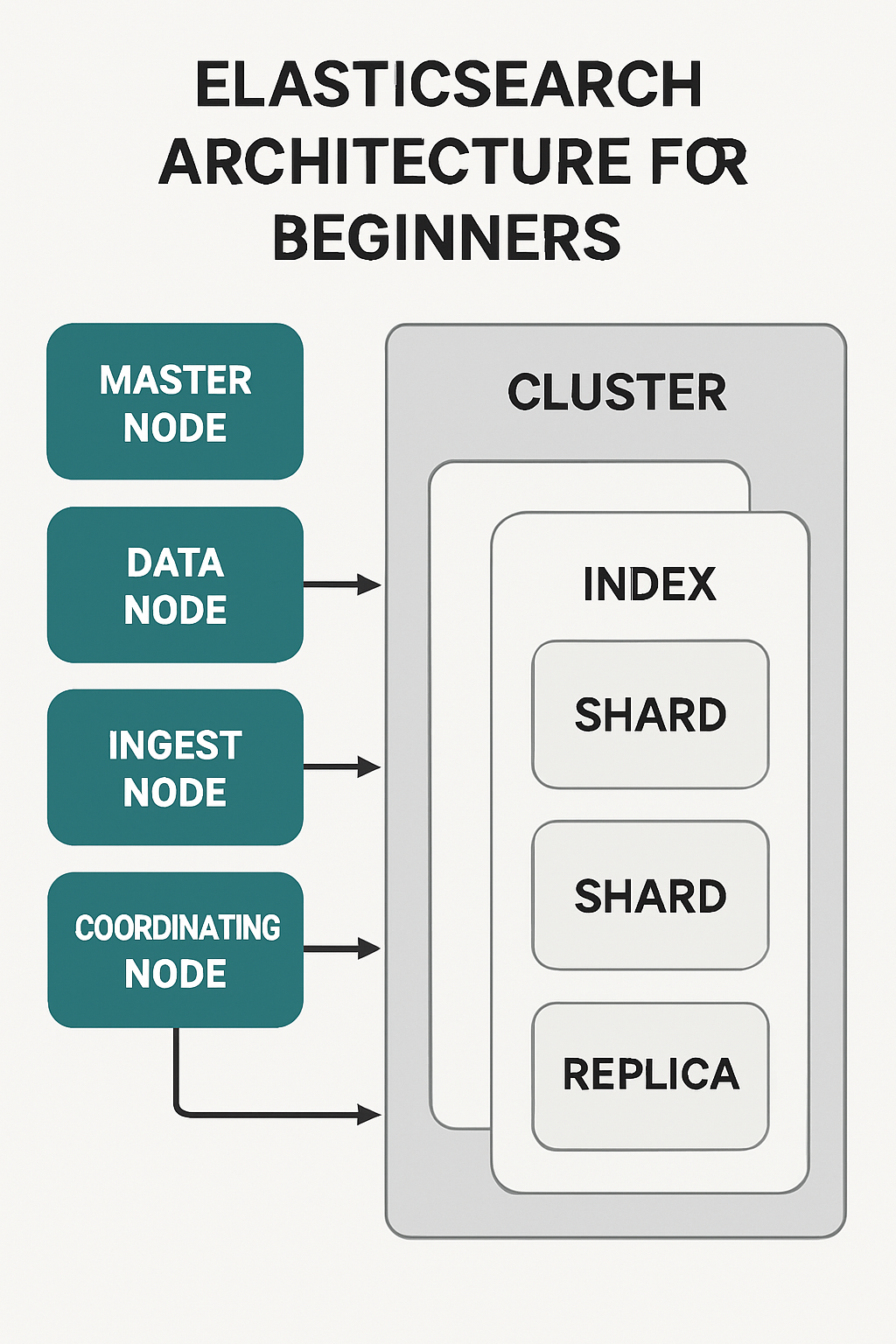
Cluster: A cluster is a collection of one or more nodes that work together and share the same cluster name. It provides a single logical namespace and distributes data and search requests across nodes.
Node: A single running instance of Elasticsearch. Nodes can take on different roles:
- Master-eligible node: Participates in cluster state management and elects the master.
- Dedicated master node: Small, stable nodes whose only job is to manage cluster state (recommended for production).
- Data node: Stores data and performs CRUD, search, and aggregations.
- Ingest node: Preprocesses documents (e.g., pipelines) before indexing.
- Coordinating node (client node): Routes requests, merges results, and can act as a load balancer.
- ML node (if using X-Pack Machine Learning): Runs anomaly detection jobs.
Index: A logical namespace that contains a collection of documents with similar schema (like a database table).
Document: A JSON object representing a record stored in an index.
Shard: A physical horizontal partition of an index. Each index is split into primary shards; Elasticsearch distributes shards across nodes to scale and parallelize operations.
Replica: A copy of a primary shard providing redundancy and read throughput. Replicas protect against node failures and improve search performance.
How it fits together
When you create an index you define the number of primary shards and replicas (replica count is the number of copies per primary). Documents are routed to a specific shard, either by ID or a routing key. The cluster places shards across data nodes to balance storage and load. The elected master node holds the cluster state (metadata about indices, mappings, and shard allocation).
Important Operational Notes
Shard count is set at index creation. While Elasticsearch provides APIs (shrink/split/reindex) to change layout, planning shard counts ahead is easier.
Use an odd number of master-eligible nodes (3 or 5) to maintain quorum and avoid split-brain scenarios.
Recommended shard size: aim for 20–50 GB per shard as a practical starting point (depends on query/merge patterns).
Replicas = high availability + search throughput. For write-heavy, replicas still help search but increase storage and replication overhead.
Dedicated master nodes should be small and isolated from heavy data node workloads. Data nodes should have fast disks and sufficient memory/CPU for query workloads.
Best Practices
Start with a modest number of shards and scale horizontally by adding nodes rather than creating many small shards.
Monitor cluster health (green/yellow/red), shard allocation, node metrics, JVM GC, and disk usage.
Use snapshots for backups (store snapshots in S3, GCS, etc.).
Implement Index Lifecycle Management (ILM) for time-series data to automate rollover, shrink, and deletion.
Avoid running master, ingest, and data-heavy tasks on the same instances in large clusters—dedicated roles improve stability.
Quick Commands
Check cluster health:
curl -s "http://localhost:9200/_cluster/health?pretty"
Create an index with 3 primary shards and 1 replica:
curl -X PUT "http://localhost:9200/my-index" -H 'Content-Type: application/json' -d' { "settings": { "number_of_shards": 3, "number_of_replicas": 1 } }'
Get index allocation:
curl -s "http://localhost:9200/_cat/shards?v"
Common Pitfalls
Too many tiny shards: causes overhead and slower recovery.
Insufficient master nodes: can cause instability.
Ignoring JVM memory settings and GC tuning for heavy workloads.
Overloading a single node with mixed roles in production.
Next Steps
- Learn mappings and analyzers to control indexing and search behavior.
- Explore monitoring (Elasticsearch monitoring, Prometheus, Grafana, or Elastic Stack monitoring).
- Experiment with ILM and snapshot/restore for production maintenance.
Understanding these architectural pieces will let you design clusters that are resilient, performant, and scalable. Start small, monitor closely, and iterate as usage grows.
#Tags: #Elasticsearch #SystemDesign #SearchEngine #DataEngineering #SoftwareEngineering
About the author
bugfree.ai is an advanced AI-powered platform designed to help software engineers master system design and behavioral interviews. Whether you’re preparing for your first interview or aiming to elevate your skills, bugfree.ai provides a robust toolkit tailored to your needs. Key Features:
150+ system design questions: Master challenges across all difficulty levels and problem types, including 30+ object-oriented design and 20+ machine learning design problems. Targeted practice: Sharpen your skills with focused exercises tailored to real-world interview scenarios. In-depth feedback: Get instant, detailed evaluations to refine your approach and level up your solutions. Expert guidance: Dive deep into walkthroughs of all system design solutions like design Twitter, TinyURL, and task schedulers. Learning materials: Access comprehensive guides, cheat sheets, and tutorials to deepen your understanding of system design concepts, from beginner to advanced. AI-powered mock interview: Practice in a realistic interview setting with AI-driven feedback to identify your strengths and areas for improvement.
bugfree.ai goes beyond traditional interview prep tools by combining a vast question library, detailed feedback, and interactive AI simulations. It’s the perfect platform to build confidence, hone your skills, and stand out in today’s competitive job market. Suitable for:
New graduates looking to crack their first system design interview. Experienced engineers seeking advanced practice and fine-tuning of skills. Career changers transitioning into technical roles with a need for structured learning and preparation.
Comments
Join the discussionNo comments yet. Be the first to comment.


