
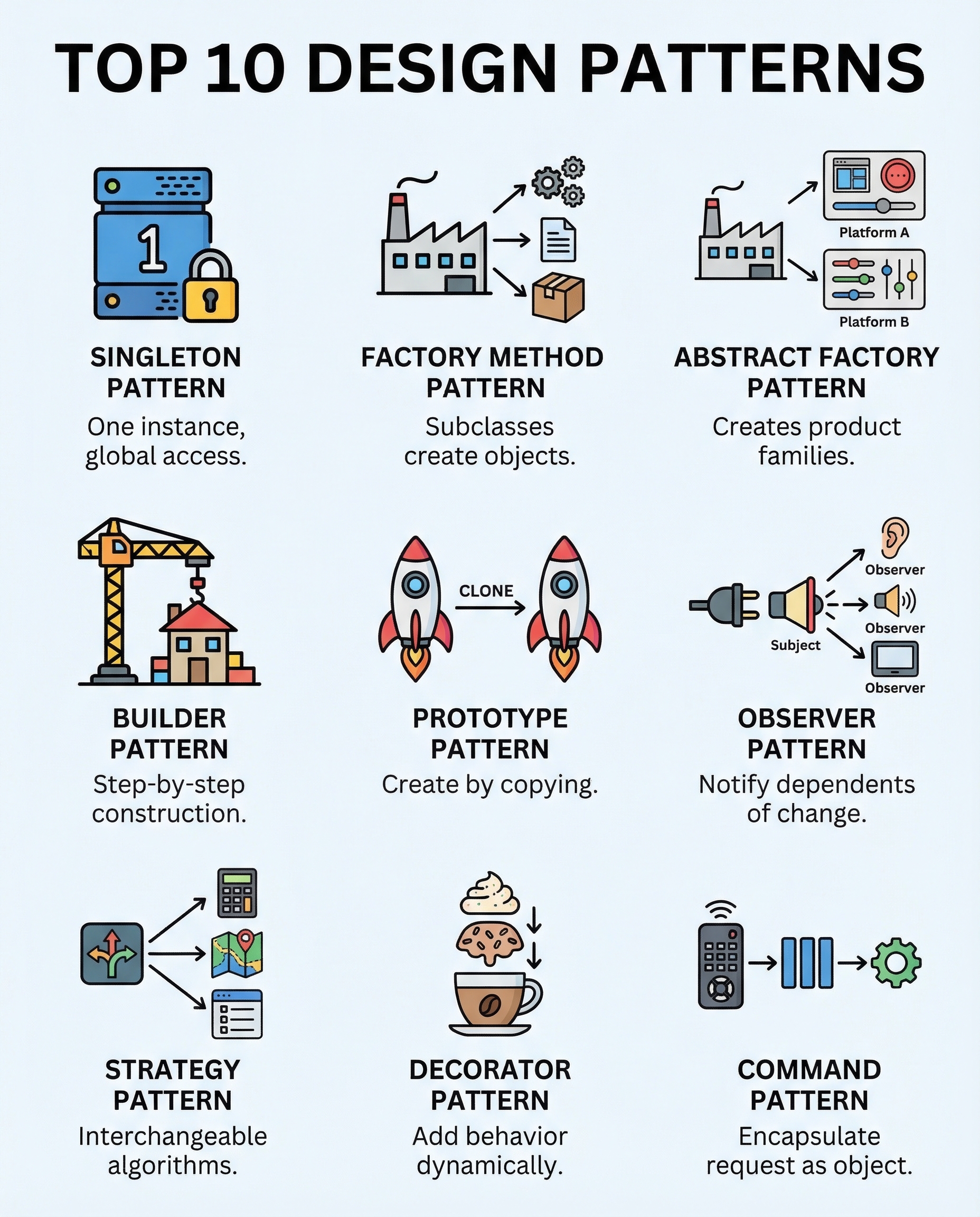
Why these 10 patterns matter
In interviews, naming the right pattern shows you recognize common problems and their conventional solutions. If you can’t identify the pattern, you risk overcomplicating the design or reinventing the wheel. Below are 10 patterns every software engineer should be able to explain concisely — what they do, when to use them, and a quick interview tip.
1) Singleton — One instance, global access
- What: Ensures a class has only one instance and provides a global point of access.
- When to use: Global managers (config, logging) where a single shared instance makes sense.
- Caveats: Can introduce hidden dependencies and testability issues; prefer dependency injection when possible.
- Interview tip: Explain thread-safety (lazy initialization vs eager) and alternatives.
2) Factory Method — Subclasses decide what to create
- What: Defines an interface for creating an object, but lets subclasses alter the type of created objects.
- When to use: When a class can’t anticipate the exact types it must create or when creation is delegated.
- Interview tip: Contrast with simple constructors and show how it supports open/closed principle.
3) Abstract Factory — Create families of related objects
- What: Provides an interface to create related or dependent objects without specifying concrete classes.
- When to use: UI toolkits where widgets must match a theme, or when variants of object families are needed.
- Interview tip: Explain how it groups factories and compare with Factory Method.
4) Builder — Construct complex objects step-by-step
- What: Separates construction of a complex object from its representation, enabling different representations.
- When to use: When creating objects with many optional parameters or complex assembly (e.g., parsers, document builders).
- Interview tip: Mention fluent APIs and immutability (build once, then immutable object).
5) Prototype — Clone instead of re-create
- What: Create new objects by copying a prototypical instance, useful when creation is expensive.
- When to use: When object instantiation is costly or when runtime configuration leads to many similar objects.
- Interview tip: Discuss shallow vs deep copy and when to implement clone methods.
6) Adapter — Make incompatible interfaces work
- What: Converts one interface into another the client expects, enabling collaboration between incompatible components.
- When to use: Integrating legacy code, third-party APIs, or bridging two subsystems.
- Interview tip: Distinguish Adapter from Facade (Adapter matches interfaces; Facade simplifies them).
7) Observer — Notify dependents on state change
- What: Defines a one-to-many dependency so when one object changes state, its dependents are notified and updated.
- When to use: Event systems, UI updates, publisher/subscriber patterns.
- Interview tip: Discuss push vs pull models and potential memory leaks (unsubscribed observers).
8) Strategy — Swap algorithms cleanly
- What: Encapsulates interchangeable algorithms inside separate classes and makes them interchangeable at runtime.
- When to use: When you need to choose algorithms dynamically (sorting strategies, pricing rules).
- Interview tip: Show how Strategy supports single responsibility and avoids conditional logic.
9) Decorator — Add behavior without modifying classes
- What: Attach additional responsibilities to an object dynamically by wrapping it in decorator objects.
- When to use: Adding cross-cutting features (logging, validation, caching) without subclass explosion.
- Interview tip: Compare with inheritance and explain how decorators can be stacked.
10) Command — Wrap requests; enables undo/redo
- What: Encapsulates a request as an object, allowing parameterization, queuing, logging, and undo/redo.
- When to use: GUI actions, task scheduling, transaction scripts with undo capability.
- Interview tip: Mention how Command separates invoker from receiver and makes operations first-class objects.
Quick study strategy
- Know the intent, structure (participants), and a simple example for each pattern.
- Be ready to explain trade-offs and real-world alternatives.
- In live design questions, try to name patterns only when they genuinely fit—don’t force them.
Good luck — be concise in interviews: name the pattern, explain the problem it solves, and highlight one trade-off.
#SoftwareEngineering #SystemDesign #CodingInterview
About the author
bugfree.ai is an advanced AI-powered platform designed to help software engineers master system design and behavioral interviews. Whether you’re preparing for your first interview or aiming to elevate your skills, bugfree.ai provides a robust toolkit tailored to your needs. Key Features:
150+ system design questions: Master challenges across all difficulty levels and problem types, including 30+ object-oriented design and 20+ machine learning design problems. Targeted practice: Sharpen your skills with focused exercises tailored to real-world interview scenarios. In-depth feedback: Get instant, detailed evaluations to refine your approach and level up your solutions. Expert guidance: Dive deep into walkthroughs of all system design solutions like design Twitter, TinyURL, and task schedulers. Learning materials: Access comprehensive guides, cheat sheets, and tutorials to deepen your understanding of system design concepts, from beginner to advanced. AI-powered mock interview: Practice in a realistic interview setting with AI-driven feedback to identify your strengths and areas for improvement.
bugfree.ai goes beyond traditional interview prep tools by combining a vast question library, detailed feedback, and interactive AI simulations. It’s the perfect platform to build confidence, hone your skills, and stand out in today’s competitive job market. Suitable for:
New graduates looking to crack their first system design interview. Experienced engineers seeking advanced practice and fine-tuning of skills. Career changers transitioning into technical roles with a need for structured learning and preparation.
Comments
Join the discussionNo comments yet. Be the first to comment.


