Stop Using Accuracy Blindly: Tune the Threshold
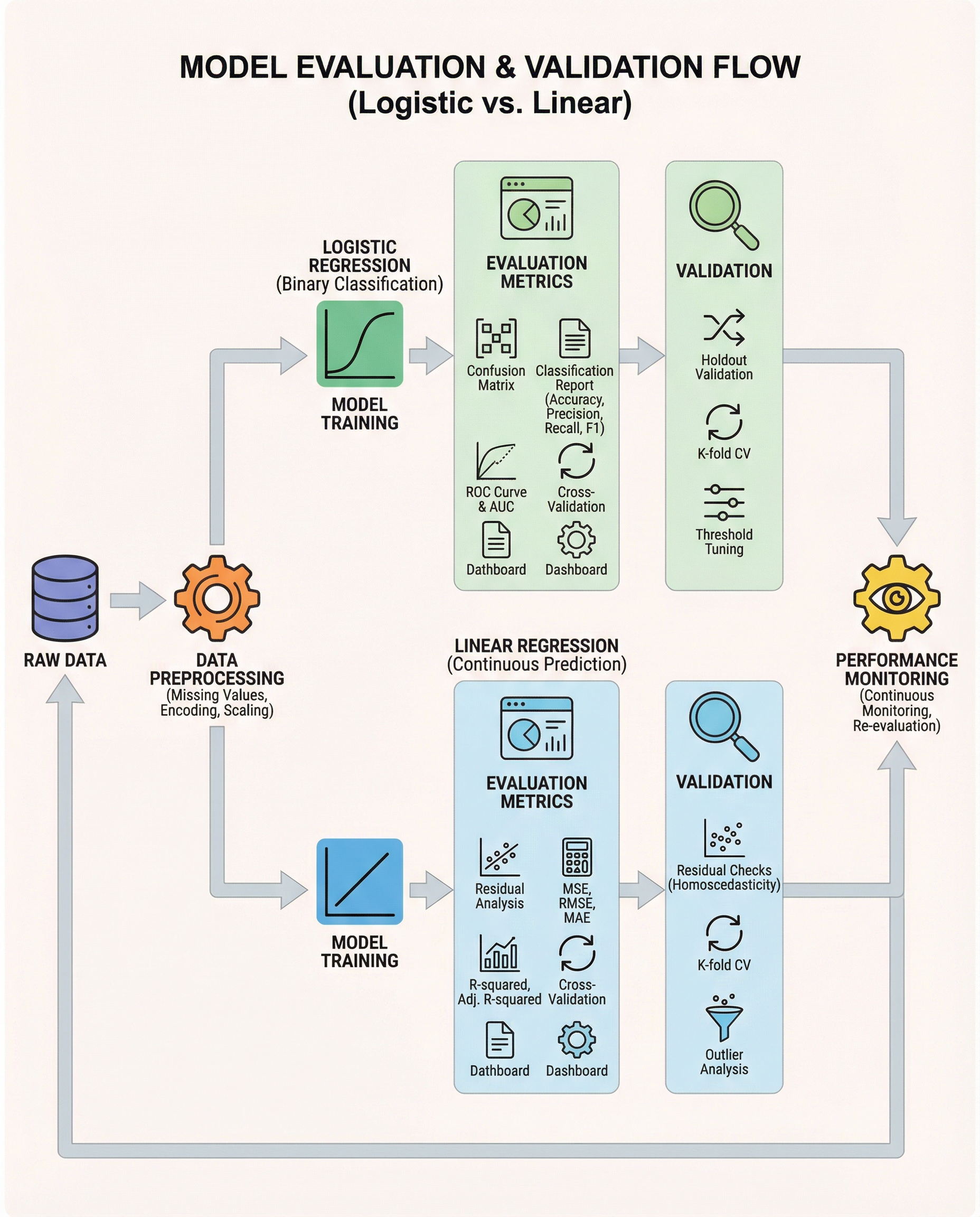
In interviews, the real distinction isn’t that "logistic = classification." It’s that logistic regression outputs probabilities, and you must decide which probability cutoff (threshold) converts those probabilities into class predictions.
Defaulting to 0.5 is lazy and often harmful. The right threshold depends on business costs and the error types you can tolerate.
Why 0.5 can be the wrong choice
- If false negatives are costly (fraud detection, disease screening), a 0.5 cutoff may miss too many positives. Lower the threshold to increase recall.
- If false positives are costly (spam filtering with user friction, expensive follow-ups), raise the threshold to improve precision.
- Accuracy hides these trade-offs, especially with class imbalance: a high accuracy can coincide with zero detection of the minority class.
Metrics & tools to help choose a threshold
- Confusion matrix: visualizes the trade-off between false positives and false negatives at a specific threshold.
- Precision–Recall curve: best when classes are imbalanced and you care about positive class performance.
- ROC and ROC-AUC: compare models across all thresholds; useful for model selection independent of a specific cutoff.
- Calibration plots: ensure predicted probabilities are meaningful before thresholding.
Practical threshold-selection strategies:
- Select the threshold that meets a business constraint (e.g., recall >= 90%).
- Maximize an aggregate metric (F1, or F-beta if you value recall/precision differently).
- Minimize expected business cost if you can quantify the cost of FN vs FP.
- Use Youden’s J (sensitivity + specificity − 1) to trade off both errors for balanced problems.
Practical workflow (short)
- Split data: training, validation (for threshold tuning), holdout test.
- Train model and produce predicted probabilities on validation data.
- Compute metrics across many thresholds (or use precision–recall/ROC curves).
- Pick the threshold that aligns with business goals, then verify on the holdout set.
Minimal scikit-learn example
# produce probabilities
probs = model.predict_proba(X_val)[:, 1]

# find threshold that yields recall >= 0.9
from sklearn.metrics import precision_recall_curve
precisions, recalls, thresholds = precision_recall_curve(y_val, probs)

import numpy as np
idx = np.argmax(recalls >= 0.90)  # first threshold meeting the recall constraint
chosen_threshold = thresholds[idx]

# apply threshold
preds = (probs >= chosen_threshold).astype(int)
Or, to evaluate many thresholds explicitly:
from sklearn.metrics import precision_score, recall_score
best = None
for t in np.linspace(0, 1, 101):
    p = (probs >= t).astype(int)
    # compute metrics relevant to your objective
    rec = recall_score(y_val, p)
    prec = precision_score(y_val, p)
    # track the best threshold by your business metric
What to say in interviews (short and crisp)
"I won’t default to 0.5. I’ll tune the decision threshold based on business cost—using the confusion matrix and PR/ROC curves—to meet the required precision/recall trade-off. For model comparison I’ll use ROC-AUC, but the final operating point will be chosen to match business objectives."
Keep this mindset: model probabilities are useful only if you pick the right threshold for the problem.
#MachineLearning #DataScience #InterviewPrep
About the author
bugfree.ai is an advanced AI-powered platform designed to help software engineers master system design and behavioral interviews. Whether you’re preparing for your first interview or aiming to elevate your skills, bugfree.ai provides a robust toolkit tailored to your needs. Key Features:
150+ system design questions: Master challenges across all difficulty levels and problem types, including 30+ object-oriented design and 20+ machine learning design problems. Targeted practice: Sharpen your skills with focused exercises tailored to real-world interview scenarios. In-depth feedback: Get instant, detailed evaluations to refine your approach and level up your solutions. Expert guidance: Dive deep into walkthroughs of all system design solutions like design Twitter, TinyURL, and task schedulers. Learning materials: Access comprehensive guides, cheat sheets, and tutorials to deepen your understanding of system design concepts, from beginner to advanced. AI-powered mock interview: Practice in a realistic interview setting with AI-driven feedback to identify your strengths and areas for improvement.
bugfree.ai goes beyond traditional interview prep tools by combining a vast question library, detailed feedback, and interactive AI simulations. It’s the perfect platform to build confidence, hone your skills, and stand out in today’s competitive job market. Suitable for:
New graduates looking to crack their first system design interview. Experienced engineers seeking advanced practice and fine-tuning of skills. Career changers transitioning into technical roles with a need for structured learning and preparation.
Comments
Join the discussionNo comments yet. Be the first to comment.