
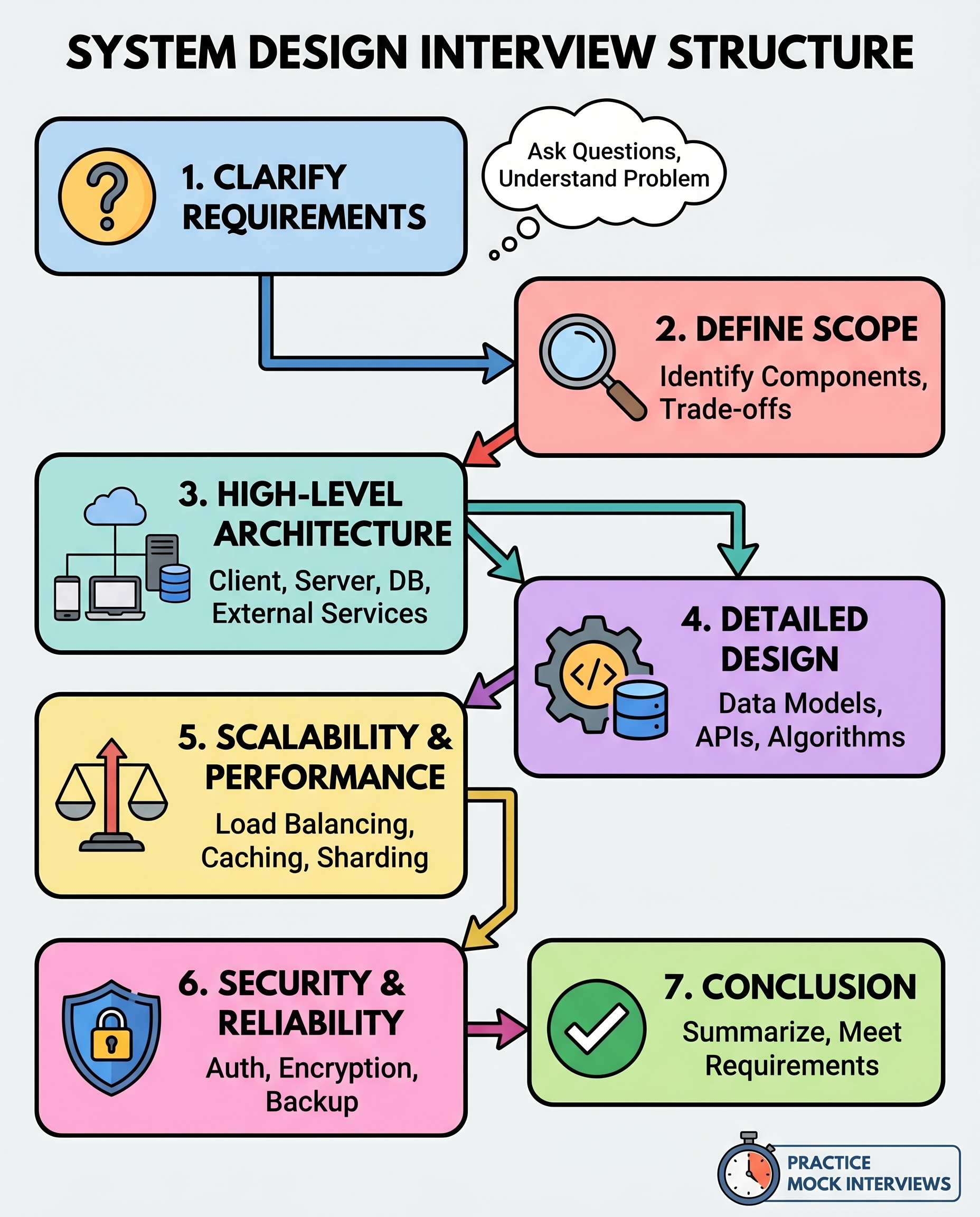

Stop improvising during system design interviews. Treat them like architecture sessions, not guessing games. Use a repeatable, seven-step framework that shows structure, trade-offs, and clear thinking — the things interviewers want to see.
A 7-step framework to answer like an architect
1) Clarify requirements
- Ask about users, traffic patterns, and success metrics: Who are the users? What load should the system handle (RPS, TPS, concurrent users)?
- Identify core features vs nice-to-haves: What must the system do now, and what can wait?
- Confirm nonfunctional requirements: latency, SLA, consistency, cost limits, regulatory constraints.
Why it matters: Many wrong answers start from hidden assumptions. Clarifying upfront keeps your design grounded.
2) Define scope
- Explicitly state the scope you’ll design (MVP vs full product).
- Call out trade-offs you’re postponing: e.g., eventual consistency vs strict consistency, batch processing vs real-time.
- If asked for scale, say whether you’ll design for current traffic or future growth and quantify it.
Why it matters: Interviewers want to see you manage constraints and prioritize—don’t try to solve everything at once.
3) High-level architecture
- Sketch major components: clients, gateways/APIs, application services, databases, message queues, and third-party services.
- Show interactions and data flow (read vs write paths).
- Use clear naming and simple boxes; a few well-chosen components beat a cluttered diagram.
Tip: Narrate the diagram as you draw: “Client → API Gateway for auth & routing → Service A for writes → DB.”
4) Deep dive (pick one or two areas)
- Choose where to go deep: data model, a core API, caching strategy, or a critical algorithm.
- For data models: show key tables/collections and indexes. For APIs: surface endpoints, payloads, and idempotency considerations.
- For algorithms: outline complexity, trade-offs, and edge-case handling.
Why it matters: Interviewers want depth. Focus on the part that matters most to the system’s correctness or performance.
5) Scale and performance
- Address load balancing, caching layers, read replicas, and sharding strategies.
- Identify bottlenecks and mitigation plans (e.g., async processing, rate limiting, backpressure).
- Give quantitative targets where possible: cache hit rates, expected RPS per server, partitioning keys.
Tip: Use simple math to justify design decisions (requests/sec × work/request → capacity needed).
6) Security, reliability, and operations
- Cover auth and authorization, encryption in transit and at rest, and key management.
- Discuss backups, disaster recovery, monitoring, alerting, and rollback strategies.
- Consider consistency vs availability trade-offs in failure scenarios.
Why it matters: Practical systems fail — show you’ve thought about operability and safety.
7) Summarize and map back to requirements
- Recap your design and explicitly tie features back to the original requirements and constraints.
- State known weaknesses and next steps: what you’d add given more time or higher scale.
Why it matters: Closing the loop demonstrates that your design meets the ask and that you can prioritize future work.
Interview language and pacing
- Use phrases like: “I’m going to assume…,” “I’ll scope this to…,” “Shall I dive deeper into X?”
- Manage time: spend ~2–5 minutes on clarification, ~5 minutes on high-level architecture, and the rest on deep dives and trade-offs.
- If unsure, ask: “Do you want a high-level overview or a deep dive on a specific component?”
Common pitfalls to avoid
- Diving into micro-optimizations before establishing the big picture.
- Ignoring failure modes and operational concerns.
- Making hidden assumptions—state them aloud.
Practice strategy
- Run mock interviews using this flow until it becomes second nature.
- Time-box each step and practice quick sketches and clear narration.
- After each mock, get feedback on clarity, trade-off reasoning, and where you lacked depth.
Practice this framework until it’s automatic. In interviews, that calm, structured approach will make you sound like an architect — not a guessing machine.
#SystemDesign #SoftwareEngineering #TechInterviews
About the author
bugfree.ai is an advanced AI-powered platform designed to help software engineers master system design and behavioral interviews. Whether you’re preparing for your first interview or aiming to elevate your skills, bugfree.ai provides a robust toolkit tailored to your needs. Key Features:
150+ system design questions: Master challenges across all difficulty levels and problem types, including 30+ object-oriented design and 20+ machine learning design problems. Targeted practice: Sharpen your skills with focused exercises tailored to real-world interview scenarios. In-depth feedback: Get instant, detailed evaluations to refine your approach and level up your solutions. Expert guidance: Dive deep into walkthroughs of all system design solutions like design Twitter, TinyURL, and task schedulers. Learning materials: Access comprehensive guides, cheat sheets, and tutorials to deepen your understanding of system design concepts, from beginner to advanced. AI-powered mock interview: Practice in a realistic interview setting with AI-driven feedback to identify your strengths and areas for improvement.
bugfree.ai goes beyond traditional interview prep tools by combining a vast question library, detailed feedback, and interactive AI simulations. It’s the perfect platform to build confidence, hone your skills, and stand out in today’s competitive job market. Suitable for:
New graduates looking to crack their first system design interview. Experienced engineers seeking advanced practice and fine-tuning of skills. Career changers transitioning into technical roles with a need for structured learning and preparation.
Comments
Join the discussionNo comments yet. Be the first to comment.


