
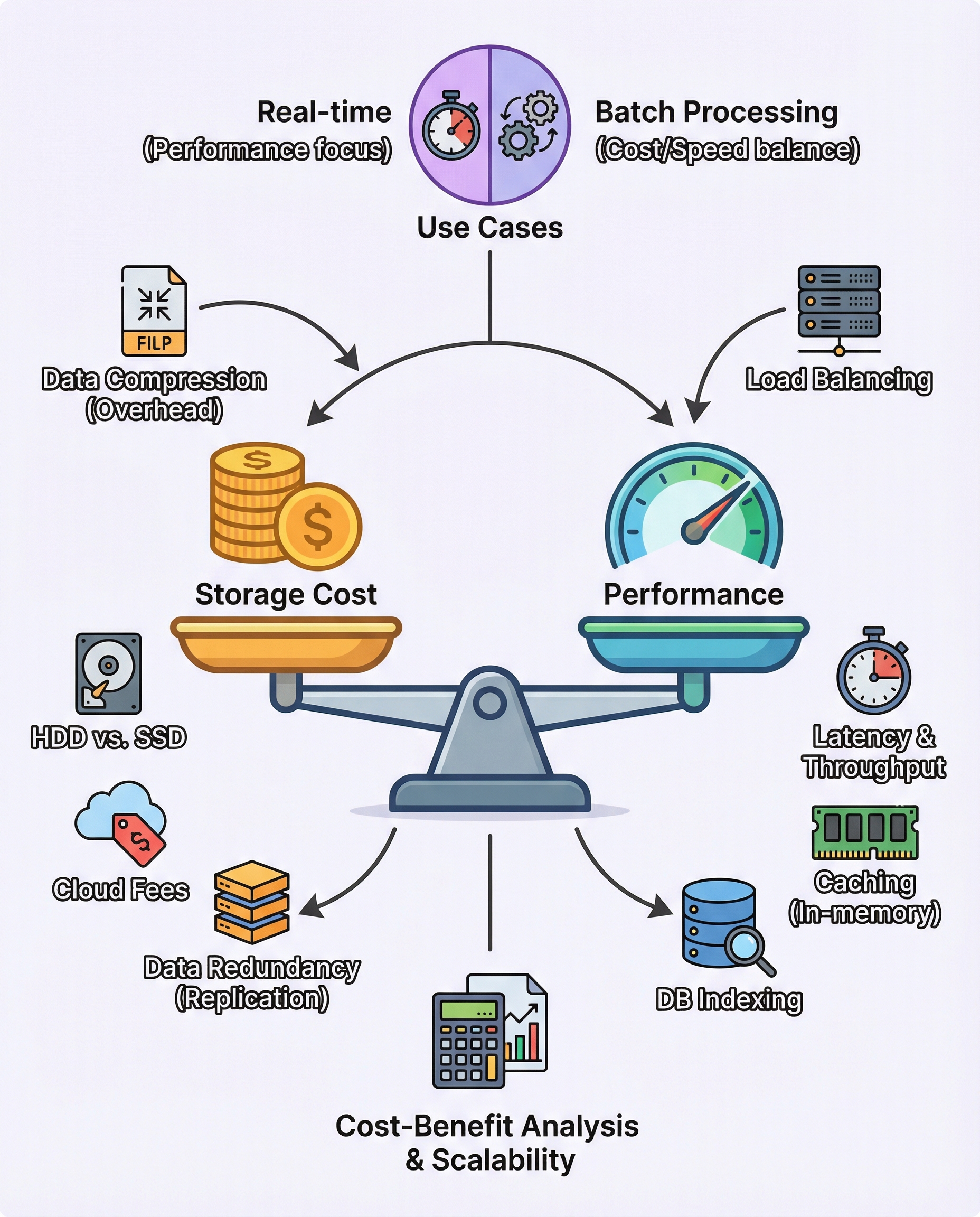
System Design Interviews: Defend Storage Cost vs Performance Trade-offs
In system design interviews you should do more than name storage options — you must justify them. Interviewers look for structured thinking: clarifying the use case, comparing options, calling out hidden costs, suggesting optimizations, and, crucially, quantifying the trade-offs so your decision holds up as the system scales.
Below is a practical framework and language you can use to defend storage cost vs performance trade-offs.
1) Start by clarifying the use case
- What are the SLOs? (latency percentiles, throughput, availability)
- What are the durability and recovery needs? (RPO, RTO)
- Is the workload real-time or batch?
Guideline:
- Real-time systems pay for low latency and higher IOPS (e.g., SSDs, in-memory caches).
- Batch/analytics systems can trade latency for lower cost (e.g., HDD, cold cloud storage).
State this explicitly in the interview: “Is this a user-facing low-latency path or an offline processing pipeline?”
2) Compare storage options (short pros/cons)
- In-memory (RAM/Redis/Memcached)
- Pros: microsecond–millisecond latency, high throughput.
- Cons: high cost per GB, persistence complexity, larger memory footprint.
- SSD / NVMe
- Pros: low-latency persistent storage, good random I/O performance.
- Cons: cost > HDD, limited write endurance for some workloads.
- HDD
- Pros: lowest cost per GB, good for large sequential reads/writes.
- Cons: high latency for random access.
- Cloud object storage (S3/Blob)
- Pros: very low cost for cold data, virtually unlimited capacity.
- Cons: higher retrieval latency, possible egress and request costs.
When you pick one, explain why it satisfies the SLOs and what you’re trading away.
3) Call out hidden/operational costs
- Replication/Backups: multiplies storage cost (factor = number of replicas + retention snapshots).
- Compression: reduces storage but increases CPU and read latency.
- Encryption: adds CPU or potential latency and key-management overhead.
- Egress/Request Costs (cloud): frequent reads can incur significant ongoing costs.
- Metadata/index overhead: small items can have large metadata proportional cost.
- Operational complexity: hot/cold tiering, backup schedules, and restore testing cost time and money.
Always mention these: interviewers expect you to know they exist and how they affect cost/performance.
4) Optimizations you can propose
- Caching (L1 in-memory cache, L2 SSD cache): reduces read latency and backend load.
- Tiered storage: keep hot data in RAM/SSD, warm on SSD, cold on HDD/cloud.
- Indexing and partitioning: reduce IO amplification and make reads more efficient.
- Compaction / data lifecycle policies: delete/compact old data to control growth.
- Compression and deduplication: good for write-once, read-rarely workloads.
- Lazy loading / prefetching: avoid loading cold data unless needed.
- Load balancing and sharding: distribute IO to avoid hotspots.
For each optimization, note the trade-off — e.g., caching adds memory cost and invalidation complexity.
5) Quantify the trade-off (the interview focal point)
Interviewers expect numbers, even rough ones. Walk through a simple calculation:
- Pick baseline and target: current storage type and the alternative.
- Estimate unit costs (use cloud prices or say “assume X”).
- Calculate delta cost = (cost_per_GB_alt − cost_per_GB_base) × data_size × replication_factor.
- Estimate latency improvement (ms) or throughput gain (QPS).
- Compute cost per unit improvement: cost_delta / latency_improvement (or / QPS improvement).
Example (illustrative):
- Assume RAM costs ~10× SSD per GB (use concrete numbers if asked).
- Data size: 1 TB; replication factor: 3.
- Cost difference per month = (price_RAM − price_SSD) × 1 TB × 3.
- If moving to RAM reduces P99 latency from 50 ms to 5 ms (45 ms improvement), you can compute how much extra you pay per millisecond saved.
Phrase it clearly: “Moving to RAM will cost an extra $X/month for 45ms P99 reduction — that’s $Y per saved millisecond. Given our SLA of P99 ≤ 10ms, this extra cost is justified because…”
If you don’t have exact cloud prices in an interview, say so and use round numbers or ratios — interviewers care about the method.
6) Explain how it scales with data growth
- Linear vs non-linear costs: raw storage cost usually grows linearly with data size, but indirect costs can grow faster (e.g., metadata, indices, per-object overhead).
- Replication multiplies growth: storing 1 PB with RF=3 is 3 PB of raw storage.
- Hotset dynamics: if hot data grows beyond the cache/tier capacity, you’ll need more expensive storage, causing step changes in cost.
- Operational costs (backup windows, compaction time) increase with data and can create performance impacts.
Bring these points into your answer: “If our data grows 3× in 12 months, our in-memory cost would triple, so we should consider tiering or moving older data to cheaper storage to keep costs sustainable.”
7) A quick interviewer-ready template
- Clarify SLOs: what latency/durability do we need?
- Recommend storage: choose X because it meets SLOs.
- Call out hidden costs: replication/compression/egress.
- Suggest optimizations: caching/tiering/indexing.
- Quantify: give a cost vs latency number and show scaling impact.
One-liner to close an answer: “Using SSD + a memory cache meets our P99 goal while keeping monthly storage cost at $X; switching fully to in-memory would reduce P99 by Y ms but cost roughly $Z/month more, so I’d reserve in-memory for the hottest 10% of keys.”
8) Final tips
- Always anchor with the SLOs: trade-offs are meaningless without the requirements.
- Use round numbers and explain assumptions.
- If pressed for exact pricing, say you’d consult cloud pricing but demonstrate the math.
- Show awareness of operational impacts (backups, restores, monitoring).
With this structure you can concisely defend storage decisions in interviews: clarify the use case, compare options, list hidden costs, propose optimizations, and quantify trade-offs so your recommendation is actionable and defensible.
#SystemDesign #SoftwareEngineering #TechInterviews
About the author
bugfree.ai is an advanced AI-powered platform designed to help software engineers master system design and behavioral interviews. Whether you’re preparing for your first interview or aiming to elevate your skills, bugfree.ai provides a robust toolkit tailored to your needs. Key Features:
150+ system design questions: Master challenges across all difficulty levels and problem types, including 30+ object-oriented design and 20+ machine learning design problems. Targeted practice: Sharpen your skills with focused exercises tailored to real-world interview scenarios. In-depth feedback: Get instant, detailed evaluations to refine your approach and level up your solutions. Expert guidance: Dive deep into walkthroughs of all system design solutions like design Twitter, TinyURL, and task schedulers. Learning materials: Access comprehensive guides, cheat sheets, and tutorials to deepen your understanding of system design concepts, from beginner to advanced. AI-powered mock interview: Practice in a realistic interview setting with AI-driven feedback to identify your strengths and areas for improvement.
bugfree.ai goes beyond traditional interview prep tools by combining a vast question library, detailed feedback, and interactive AI simulations. It’s the perfect platform to build confidence, hone your skills, and stand out in today’s competitive job market. Suitable for:
New graduates looking to crack their first system design interview. Experienced engineers seeking advanced practice and fine-tuning of skills. Career changers transitioning into technical roles with a need for structured learning and preparation.
Comments
Join the discussionNo comments yet. Be the first to comment.


