
Rate Limiting vs Throttling: Stop Confusing Them in System Design Interviews
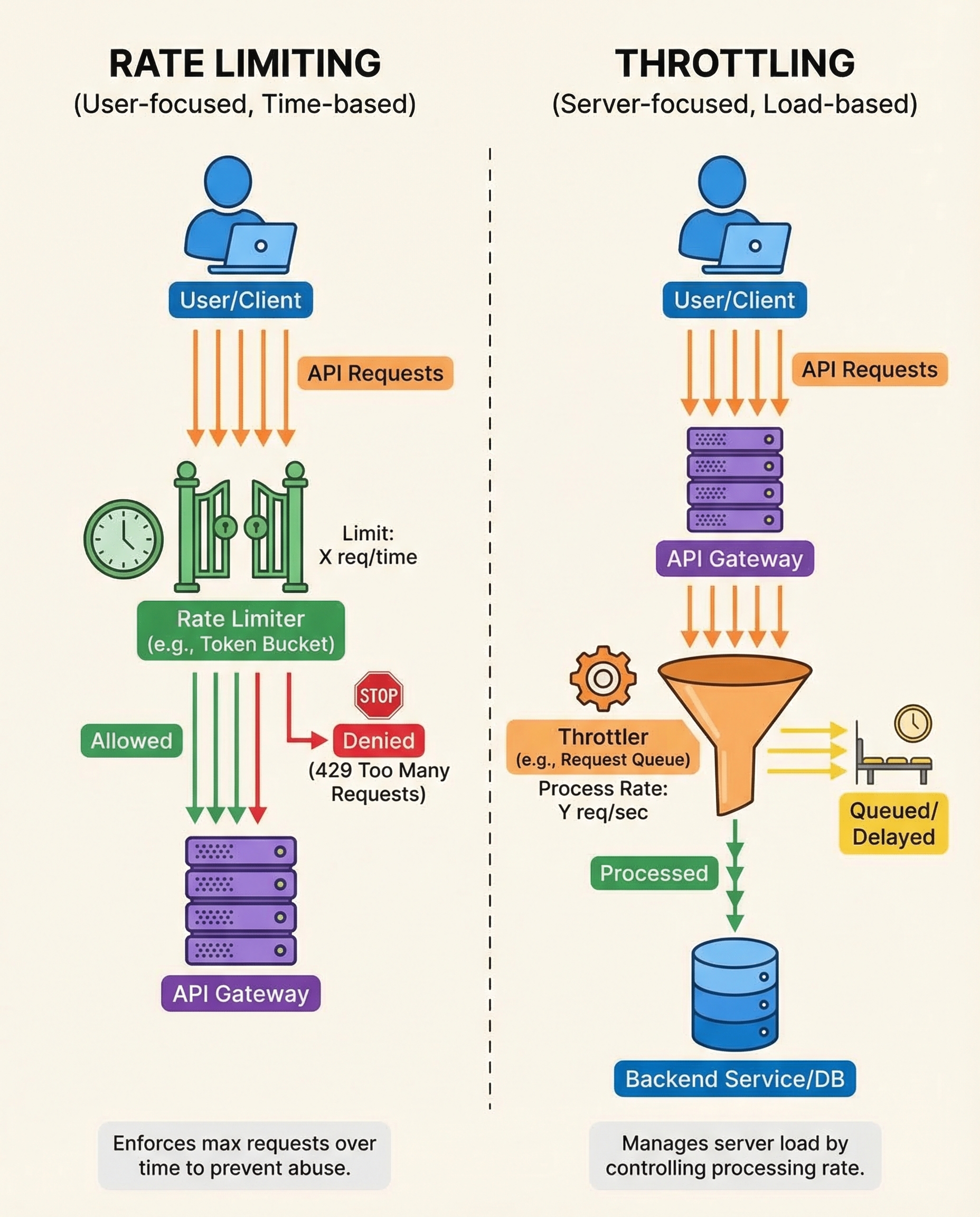
If you're preparing for API or system design interviews, you will be asked about limiting and protecting APIs. Two terms that are often used interchangeably — rate limiting and throttling — actually solve different problems. Understand the difference and you'll give clearer, more practical designs.
One-sentence rule to remember
- Rate limiting answers the question: “How many requests in a given time window?”
- Throttling answers the question: “How much load at once can the system handle?”
What is rate limiting?
Rate limiting caps the number of requests a client can make over a time window. It prevents abuse, enforces fair usage, protects downstream services, and helps capacity planning.
Common algorithms:
- Fixed window: simple counter per client per window. Easy but suffers from burstiness at window boundaries.
- Sliding window (log or counter approximation): smoother limits across boundaries.
- Token bucket: allows bursts up to bucket size while enforcing average rate.
- Leaky bucket: enforces a steady outflow rate (good for smoothing spikes).
Typical behavior and HTTP semantics:
- When exceeded, return 429 Too Many Requests.
- Include headers like Retry-After and X-RateLimit-*.
Implementation notes:
- In distributed systems use a shared store (Redis, Memcached) or a dedicated rate-limiter service.
- Use approximate counters (e.g., sliding window with fixed sub-windows) for high scale.
- Choose limits per API key, user, IP, or tenant depending on threat model.
What is throttling?
Throttling controls concurrent load and the pace of processing to keep services responsive under pressure. It focuses on capacity and graceful degradation rather than counting requests across time.
Common strategies:
- Concurrency limits / semaphores: restrict number of in-flight requests or workers.
- Queuing and worker pools: queue excess work and process at a controlled rate.
- Backpressure / flow-control: signal clients to slow down (HTTP 503, Retry-After, or custom signals).
- Exponential backoff and jitter: used by clients to avoid thundering herds.
- Circuit breakers: reject requests outright when a downstream is unhealthy.
Typical behavior and HTTP semantics:
- May delay requests or place them in a queue; if queue is full, respond with 503 Service Unavailable or 429 depending on policy.
- Aim is to keep latency predictable and protect resources (CPU, DB connections, memory).
Implementation notes:
- Use load-aware throttling: apply stricter throttling when system metrics (CPU, latency, queue) exceed thresholds.
- Combine with rate limiting for layered protection.
Quick comparison
- Purpose: Rate limiting = fairness/abuse protection. Throttling = manage resource pressure.
- Unit: Rate limiting => requests/time. Throttling => concurrency/throughput at this moment.
- Response on exceed: Rate limiting => 429. Throttling => queue/delay or 503/429 depending on policy.
Interview-friendly examples
- Login API: rate limit per IP/user (N attempts per 15 minutes) to prevent brute force.
- Image processing service: throttle concurrent transcoders to N workers; queue excess jobs.
- Public API: rate limit per API key; when system load spikes, throttle (decrease concurrency) to protect latency.
Common mistakes to avoid
- Using only rate limiting to solve sudden system overloads — it doesn't protect concurrent resource pressure.
- Applying throttling without per-client fairness — heavy clients may starve lighter ones.
- Forgetting to add Retry-After headers and clear client signals.
Quick cheat sheet (what to mention in interviews)
- Say which problem you’re solving (abuse vs capacity).
- Pick algorithms: token bucket for bursty traffic, sliding window for fairness, semaphore/queue for concurrency control.
- Discuss distribution: centralized store (Redis) vs local with coordination.
- Describe HTTP responses and client behavior (429 + Retry-After, backoff + jitter).
Conclusion
Rate limiting and throttling are complementary. Rate limiting answers “how many per time window” and enforces fairness; throttling answers “how much at once” and protects service health. In system design interviews, state which problem you’re solving, choose the appropriate pattern, and explain trade-offs.
Happy interviewing — and remember the rule: rate = how many, throttle = how much at once.
About the author
bugfree.ai is an advanced AI-powered platform designed to help software engineers master system design and behavioral interviews. Whether you’re preparing for your first interview or aiming to elevate your skills, bugfree.ai provides a robust toolkit tailored to your needs. Key Features:
150+ system design questions: Master challenges across all difficulty levels and problem types, including 30+ object-oriented design and 20+ machine learning design problems. Targeted practice: Sharpen your skills with focused exercises tailored to real-world interview scenarios. In-depth feedback: Get instant, detailed evaluations to refine your approach and level up your solutions. Expert guidance: Dive deep into walkthroughs of all system design solutions like design Twitter, TinyURL, and task schedulers. Learning materials: Access comprehensive guides, cheat sheets, and tutorials to deepen your understanding of system design concepts, from beginner to advanced. AI-powered mock interview: Practice in a realistic interview setting with AI-driven feedback to identify your strengths and areas for improvement.
bugfree.ai goes beyond traditional interview prep tools by combining a vast question library, detailed feedback, and interactive AI simulations. It’s the perfect platform to build confidence, hone your skills, and stand out in today’s competitive job market. Suitable for:
New graduates looking to crack their first system design interview. Experienced engineers seeking advanced practice and fine-tuning of skills. Career changers transitioning into technical roles with a need for structured learning and preparation.
Comments
Join the discussionNo comments yet. Be the first to comment.


