
OOD Interview Drill: Design a Social Media Feed (in 60 seconds)
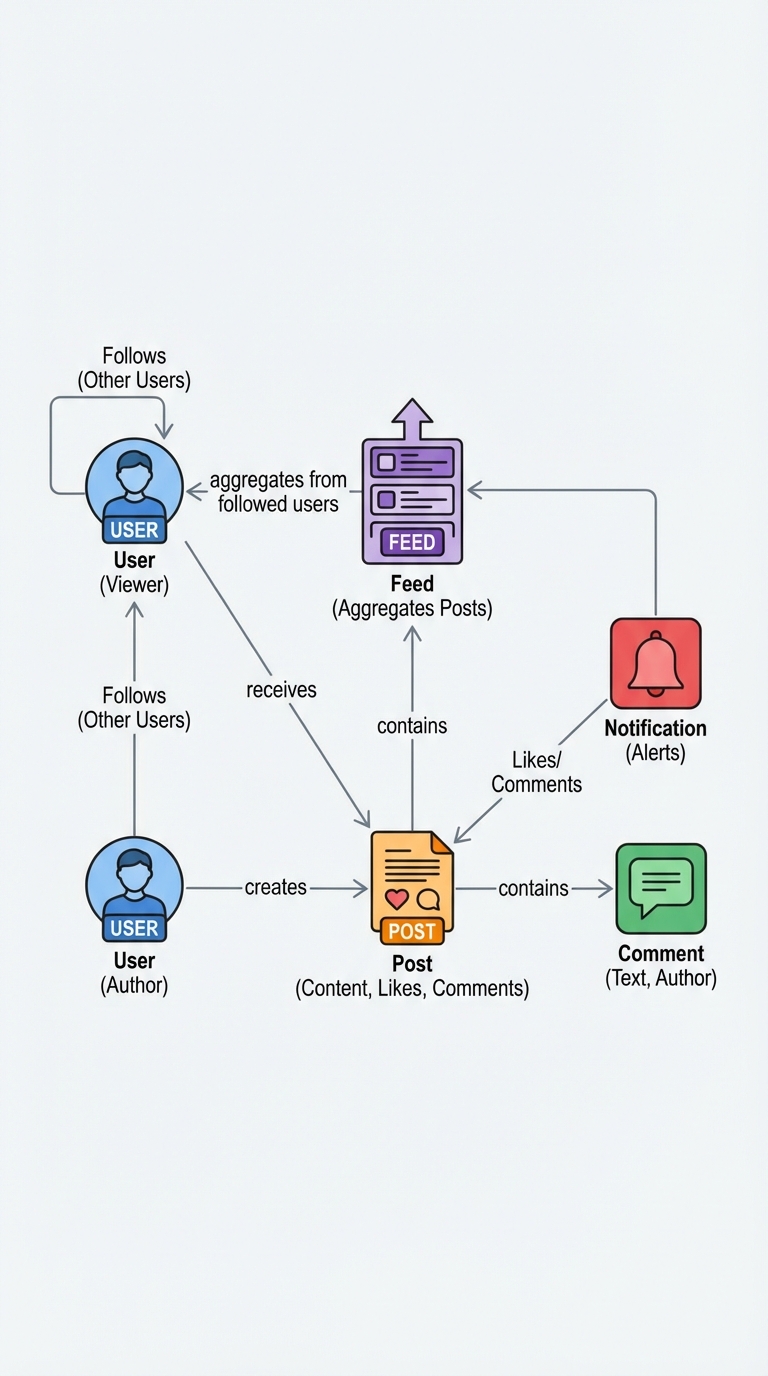
If you can model a social feed cleanly, you can handle many object-oriented design (OOD) interviews. Below is a compact, interview-friendly design that meets the requirements and explains relationships and justifications.
Requirements (must-haves)
- Users can create, edit, and delete posts.
- Feed shows posts from followed users.
- Users can like and comment on posts.
- Notifications are generated for relevant events (e.g., likes, comments, new followers).
Core classes (concise design)
User
- id
- name
- posts: List<Post>        // posts authored by this user
- following: Set<User>     // users this user follows
- notifications: List<Notification>
+ create_post(content)
+ edit_post(post_id, content)
+ delete_post(post_id)
+ follow(user)
+ unfollow(user)
Post
- id
- content
- author: User
- likes: Set<User>
- comments: List<Comment>
- created_at
+ like(user)
+ unlike(user)
+ add_comment(user, content)
+ edit(content)
+ delete()
Comment
- id
- content
- author: User
- post: Post
- created_at
+ edit(content)
+ delete()
Feed
- user: User
+ get_feed_posts(limit, cursor)
  // aggregates posts from user.following and self.user (sorted by created_at)
  // supports pagination
Notification
- id
- user: User        // recipient
- message: String
- type: Enum        // LIKE, COMMENT, FOLLOW, etc.
- related_id        // e.g., post_id or comment_id
- read: Boolean
- created_at
Relationships and justifications
- User -> Post (composition/ownership): a user "owns" posts. Keep a list of posts for quick retrieval of a user's content and for delete/ownership checks.
- Post -> Author (association): post references its author. This is necessary to display metadata and enforce edit/delete permissions.
- Post -> Likes (association to User): likes are best modeled as a set of Users (or user IDs) to prevent duplicates and to support quick membership checks.
- Post -> Comments (composition): comments are tightly coupled to a post; deleting a post typically removes its comments.
- Feed aggregates posts (association, not ownership): a Feed composes results from many users' posts — it does not own the posts.
- Notification -> User (ownership): notifications belong to a recipient user and are stored so they can be read/cleared.
Why IDs vs object references: in a real system, store IDs in the persistence layer to avoid heavyweight object graphs and to enable lazy-loading or joins. In-memory or interview diagrams can show object references for clarity.
Typical flows (short)
Create post
- User.create_post(content) -> Post created with author set.
- Save post to DB; append post id to user's posts list.
- Optionally push to followers' feeds (see scaling).
Like post
- Post.like(user) adds user to post.likes set.
- Create Notification for post.author (if liker != author).
Add comment
- Post.add_comment(user, content) creates a Comment referencing post and author.
- Save comment; append to post.comments.
- Create Notification for post.author (and possibly other participants).
Follow
- follower.follow(target) adds target to follower.following.
- Optionally create Notification for target.
Implementation notes & interview talking points
- Concurrency: like/comment should be idempotent and handle concurrent updates to likes/comments (use optimistic locking or atomic DB operations).
- Data modeling: store lists (likes, comments) as separate tables/collections for scalability; paginate comments.
- Feed generation strategies:
- Pull model: compute feed on read by querying posts from followed users (simple, consistent, good for small scale).
- Push model (fan-out): when a user posts, push the post to followers' feed timelines (fast reads, more write work and storage, required at large scale).
- Hybrid: push to active followers, pull for the rest.
- Notifications: batch or debounce frequent events to avoid spam (e.g., multiple likes from same user or bot-like activity).
- Performance: index by author and created_at for efficient feed queries; cache recent feeds; use materialized timelines for heavy users.
- Security/permissions: check author on edit/delete; validate inputs for comments and posts.
What to say in an interview
- Start with responsibilities of each class.
- Explain relationships (ownership vs association) and why you chose them.
- Mention persistence choices (IDs vs objects) and concurrency considerations.
- Discuss feed generation trade-offs (pull vs push) and how you'd scale.
This compact model demonstrates the key OOD ideas interviewers look for: clear responsibilities, correct relationships, simple APIs, and awareness of scaling and concurrency.
#ObjectOrientedDesign #SystemDesign #SoftwareEngineering
About the author
bugfree.ai is an advanced AI-powered platform designed to help software engineers master system design and behavioral interviews. Whether you’re preparing for your first interview or aiming to elevate your skills, bugfree.ai provides a robust toolkit tailored to your needs. Key Features:
150+ system design questions: Master challenges across all difficulty levels and problem types, including 30+ object-oriented design and 20+ machine learning design problems. Targeted practice: Sharpen your skills with focused exercises tailored to real-world interview scenarios. In-depth feedback: Get instant, detailed evaluations to refine your approach and level up your solutions. Expert guidance: Dive deep into walkthroughs of all system design solutions like design Twitter, TinyURL, and task schedulers. Learning materials: Access comprehensive guides, cheat sheets, and tutorials to deepen your understanding of system design concepts, from beginner to advanced. AI-powered mock interview: Practice in a realistic interview setting with AI-driven feedback to identify your strengths and areas for improvement.
bugfree.ai goes beyond traditional interview prep tools by combining a vast question library, detailed feedback, and interactive AI simulations. It’s the perfect platform to build confidence, hone your skills, and stand out in today’s competitive job market. Suitable for:
New graduates looking to crack their first system design interview. Experienced engineers seeking advanced practice and fine-tuning of skills. Career changers transitioning into technical roles with a need for structured learning and preparation.
Comments
Join the discussionNo comments yet. Be the first to comment.


