
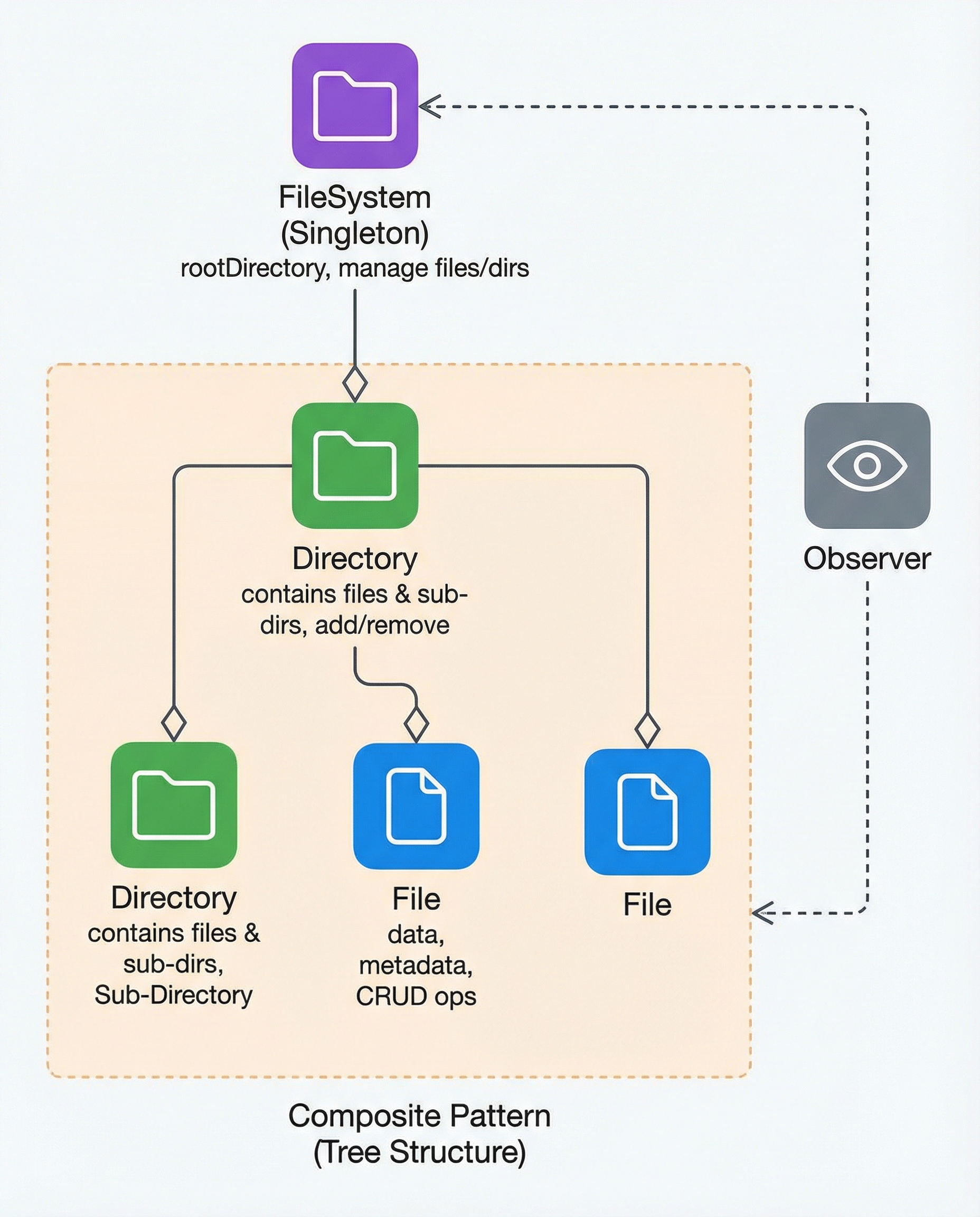
OOD Interview Drill: Design a File System Like a Pro
Designing a file system is a classic object-oriented design (OOD) interview question. The goal in an interview is to start from clear requirements, model the domain with core classes, pick suitable design patterns, and discuss extensions and trade-offs.
Below is a concise, interview-ready approach that you can use to explain a clean, maintainable design.
1) Start from requirements
Ask clarifying questions and scope the problem. Typical base requirements:
- CRUD for files and directories (create, read, update, delete)
- Navigation by path (absolute and relative)
- Metadata (name, size, timestamps)
- Permissions (read/write/execute, owners)
- Directory listing and containment
- Optional: change notifications, persistence, concurrency, versioning
Keep the initial design minimal; add complexity (persistence, caching, locking) once the core model is solid.
2) Core domain model
Model the file system as a tree of nodes. Key classes:
File
- Attributes: name, size, type, creationDate, modifiedDate, permissions, content (or reference)
- Operations: open(), read(), write(), delete(), rename(), getMetadata()
Directory
- Attributes: name, creationDate, modifiedDate, permissions, children (files + subdirectories)
- Operations: add(child), remove(child), list(), find(path)
FileSystem
- Attributes: rootDirectory
- Operations: createFile(path), createDirectory(path), delete(path), move(src, dst), findByPath(path)
Represent files and directories with a common base (e.g., FileSystemNode) so code that walks the tree treats nodes uniformly.
Example pseudo-signature:
- class FileSystemNode { name, parent, permissions, getPath() }
- class File extends FileSystemNode { size, content, read(), write() }
- class Directory extends FileSystemNode { children: Map, add(), remove(), list() }
- class FileSystem { root: Directory, create(path), delete(path), lookup(path) }
3) Useful design patterns
Composite
- Use Composite to model the hierarchical tree where Directory contains FileSystemNode children and both File and Directory implement the same interface.
Singleton
- If you want exactly one in-memory FileSystem instance during runtime, the FileSystem object can be a Singleton. In distributed or testable systems, prefer dependency injection instead of a strict Singleton.
Observer
- If clients need to be notified of changes (e.g., file change events), use Observer/Publisher-Subscriber to broadcast events such as create, delete, modify.
4) Path resolution and navigation
Path resolution is essential; design a robust resolver:
- Support absolute ("/a/b/c") and relative ("../x") paths
- Tokenize by path separator, walk from root or current directory
- Handle special entries: "." and ".."
- Fail fast on invalid paths and provide clear error codes/exceptions
Example: lookup(path) returns the node at path or throws NotFound.
5) Concurrency, persistence, and other concerns
When extending beyond an in-memory toy FS, discuss these cross-cutting concerns:
Concurrency & locking
- Use fine-grained locks (per node) or transactional locks for multi-operation consistency
- Consider optimistic locking or versioning for high read concurrency
Persistence
- Persist metadata to a database or a disk-backed store
- For large files, store content externally (object store) and keep references in metadata
Permissions & Security
- Implement ACLs or UNIX-like permission bits
- Enforce checks in all mutation APIs
Performance
- Caching directory listings or metadata
- Lazy-loading large file contents
Scalability
- Partition namespace or shard directories for massive scale
- Use distributed coordination (consensus, leader election) for a clustered FS
6) Optional extensions (good to mention in interviews)
- Versioning / snapshots
- Quotas and usage accounting
- Search and indexing of metadata
- Replication and high availability
- Event stream for change notifications (audit, watchers)
7) Example API walkthrough (short)
- createFile(path) -> validate parent path, check permissions, add File node
- readFile(path) -> lookup file, check read permission, return content
- writeFile(path, data) -> lookup or create file, check write permission, update content and size
- delete(path) -> lookup node, remove from parent children map, publish delete event
8) Wrap-up: interview talking points
- Always begin with requirements and constraints
- Model the tree using Composite; favor clean interfaces
- Explain how you would handle concurrency, persistence, and scaling
- Mention trade-offs (simplicity vs. correctness, in-memory vs. durable storage)
With a clear model (File, Directory, FileSystem), a path resolver, and a few patterns (Composite, Singleton, Observer), you can communicate a robust, interview-ready design for a file system.
#ObjectOrientedDesign #SystemDesign #SoftwareEngineering
About the author
bugfree.ai is an advanced AI-powered platform designed to help software engineers master system design and behavioral interviews. Whether you’re preparing for your first interview or aiming to elevate your skills, bugfree.ai provides a robust toolkit tailored to your needs. Key Features:
150+ system design questions: Master challenges across all difficulty levels and problem types, including 30+ object-oriented design and 20+ machine learning design problems. Targeted practice: Sharpen your skills with focused exercises tailored to real-world interview scenarios. In-depth feedback: Get instant, detailed evaluations to refine your approach and level up your solutions. Expert guidance: Dive deep into walkthroughs of all system design solutions like design Twitter, TinyURL, and task schedulers. Learning materials: Access comprehensive guides, cheat sheets, and tutorials to deepen your understanding of system design concepts, from beginner to advanced. AI-powered mock interview: Practice in a realistic interview setting with AI-driven feedback to identify your strengths and areas for improvement.
bugfree.ai goes beyond traditional interview prep tools by combining a vast question library, detailed feedback, and interactive AI simulations. It’s the perfect platform to build confidence, hone your skills, and stand out in today’s competitive job market. Suitable for:
New graduates looking to crack their first system design interview. Experienced engineers seeking advanced practice and fine-tuning of skills. Career changers transitioning into technical roles with a need for structured learning and preparation.
Comments
Join the discussionNo comments yet. Be the first to comment.


