
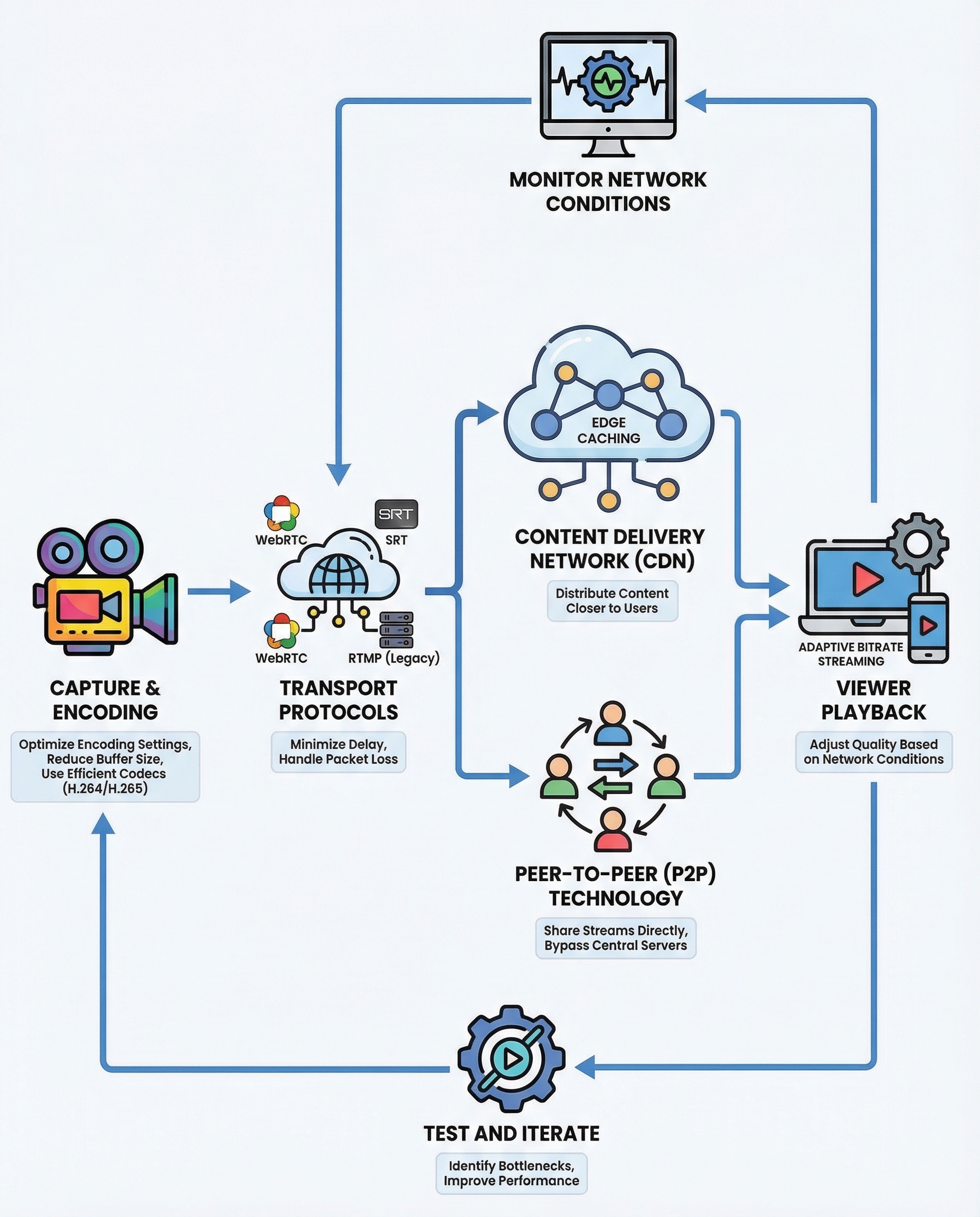
System Design Interview: How to Build Low‑Latency Live Streaming (What Actually Matters)
Low latency = the time from camera capture to viewer playback. In system-design interviews you should (1) explain where latency is introduced in the pipeline, and (2) show practical levers to reduce it. Below is a concise, interview-ready guide with the levers that actually matter.
Why it matters (quick numbers):
- WebRTC-style setups: typically < 500 ms (real-time)
- Low-latency HLS / CMAF: ~2–6 s
- Traditional HLS/DASH: 10–30+ s
If an interviewer asks “how would you reduce delay?”, walk through the pipeline and then discuss the four primary levers below. Finish with buffer tuning, monitoring, and iterative testing.
Where latency comes from (brief pipeline)
- Capture & frame grab (camera encoding pipeline latency)
- Encode (software/hardware encoder, GOP/keyframe interval)
- Transport to origin (ingest, network RTT, packet loss recovery)
- Server processing & CDN hops (packaging, transmuxing, edge propagation)
- Player download & buffering (chunk boundaries, player jitter buffer)
- Decode & render (decoder latency, frame pacing)
Mention these components, then propose concrete tradeoffs and mitigations.
The 4 levers that matter
1) Encode fast
- Use hardware encoders (NVENC, QuickSync) for predictable, low-latency encode.
- Choose low-latency encoder presets (tuned for speed over compression).
- Reduce GOP / keyframe interval — shorter GOP lowers segment latency and speeds recovery but increases bitrate overhead.
- Use constant bitrate (CBR) or tightly controlled rate control for stable delivery.
- Tune encoder settings: lower lookahead, disable B-frames (or reduce them), and reduce encoder buffering.
Why: encoding delay can be hundreds of milliseconds to seconds depending on settings. Fast encoding reduces the first major chunk of E2E latency.
2) Pick the right protocol
- RTMP: common for ingestion to servers (low complexity) but not ideal for final delivery to modern browsers.
- WebRTC: best for ultra-low-latency (<500 ms), two-way comms, built-in NAT traversal and congestion control. Native in browsers — great for interactive apps.
- SRT / RIST: designed for low-latency contribution and resilient transport over lossy networks. Good for contribution and backbone links, not browser playback.
- Low-latency HLS / DASH (CMAF, chunked-transfer): lowers segment latency vs classic HLS but usually still ~2–6s.
Tradeoffs: WebRTC gives the lowest latency but higher server complexity and cost (SFU/MCU and more CPU). SRT/RIST are excellent between encoders and origin/CDN but require additional tooling for browser delivery.
3) Use a low‑latency CDN and push content to the edge
- Push vs pull: pushing segments or establishing a persistent stream to edge reduces origin RTTs.
- Choose CDNs or edge networks that support WebRTC or low-latency HLS/CMAF.
- Use edge transcoding to avoid round-trips to origin for multiple renditions.
- Minimize hops and use geo-routing to reduce network RTT.
Why: network and hop count multiply latency. A nearby edge node with the stream already available drastically reduces startup and per-chunk delays.
4) Adaptive bitrate (ABR) and smooth playback
- Create a multi-bitrate ladder and enable ABR switching so clients pick a stable rendition for current conditions.
- Make renditions aligned on the same keyframe boundaries to allow instant switching.
- Favor smaller chunks/segments for faster switch and lower rebuffer latency (but watch overhead).
- Consider player-side strategies: start with a conservative (lower) bitrate for fast startup then ramp up.
Why: under changing network conditions, ABR prevents rebuffering and reduces perceived latency even if raw network RTT is unchanged.
Tuning buffers, reliability and recovery
- Player buffer (playout delay): smaller buffer reduces apparent latency but increases vulnerability to jitter and packet loss.
- Jitter buffer: tuned to smooth network variability without adding unnecessary delay.
- Packet-loss strategies: FEC and forward error correction reduce retransmission needs; ARQ introduces extra RTTs and increases latency.
- Retransmits vs FEC: prefer FEC (proactive) where latency is critical; ARQ/Retransmit is acceptable for slightly higher-latency use cases.
Monitoring and metrics (what to measure)
- End-to-end latency (capture → render): the single most important metric.
- Startup time, rebuffer events, and average buffer level.
- Packet loss, jitter, and round-trip time (RTT).
- bitrate achieved vs target, dropped frames, encoder lag.
- Per-edge/cdn and per-region metrics to find hotspots.
Use synthetic tests and real-user telemetry. Plot percentiles (p50, p95, p99) — p95/p99 matter for worst-case viewer experience.
Interview tips — how to present this under interview time pressure
- Draw the pipeline: camera → encoder → transport → origin → CDN edge → player.
- For each hop, name the latency source and one mitigation (e.g., "encoder: use NVENC and lower GOP").
- Quantify targets and tradeoffs: "We can get to <500 ms with WebRTC and proper edge SFUs, or ~2–6 s with LL-HLS while saving complexity/cost."
- Discuss cost/complexity tradeoffs: lower latency often means more CPU, more edge capacity, and more complex infra.
- Mention measurable goals and monitoring to iterate after launch.
Quick checklist (practical action items)
- Use hardware encoders and low-latency presets.
- Choose protocol based on requirements: WebRTC for ultra-low latency, SRT for contribution, LL-HLS/CMAF for near-real-time delivery.
- Push to low-latency edge CDN and consider edge transcoding.
- Implement ABR with aligned keyframes and small chunk sizes.
- Tune player buffers and enable FEC where appropriate.
- Instrument end-to-end metrics and iterate based on p95/p99.
Low-latency streaming is about tradeoffs: latency vs reliability vs cost. In interviews, show you understand where delays come from, propose concrete levers (encode, protocol, CDN, ABR), and finish with monitoring and iteration.
#SystemDesign #Streaming #SoftwareEngineering
About the author
bugfree.ai is an advanced AI-powered platform designed to help software engineers master system design and behavioral interviews. Whether you’re preparing for your first interview or aiming to elevate your skills, bugfree.ai provides a robust toolkit tailored to your needs. Key Features:
150+ system design questions: Master challenges across all difficulty levels and problem types, including 30+ object-oriented design and 20+ machine learning design problems. Targeted practice: Sharpen your skills with focused exercises tailored to real-world interview scenarios. In-depth feedback: Get instant, detailed evaluations to refine your approach and level up your solutions. Expert guidance: Dive deep into walkthroughs of all system design solutions like design Twitter, TinyURL, and task schedulers. Learning materials: Access comprehensive guides, cheat sheets, and tutorials to deepen your understanding of system design concepts, from beginner to advanced. AI-powered mock interview: Practice in a realistic interview setting with AI-driven feedback to identify your strengths and areas for improvement.
bugfree.ai goes beyond traditional interview prep tools by combining a vast question library, detailed feedback, and interactive AI simulations. It’s the perfect platform to build confidence, hone your skills, and stand out in today’s competitive job market. Suitable for:
New graduates looking to crack their first system design interview. Experienced engineers seeking advanced practice and fine-tuning of skills. Career changers transitioning into technical roles with a need for structured learning and preparation.
Comments
Join the discussionNo comments yet. Be the first to comment.


