
Load Balancers: Health Checks & Failover (Interview Must-Know)
If you can't explain health checks and failover clearly, you're not ready for system design interviews. These concepts are central to availability and resilience in distributed systems.
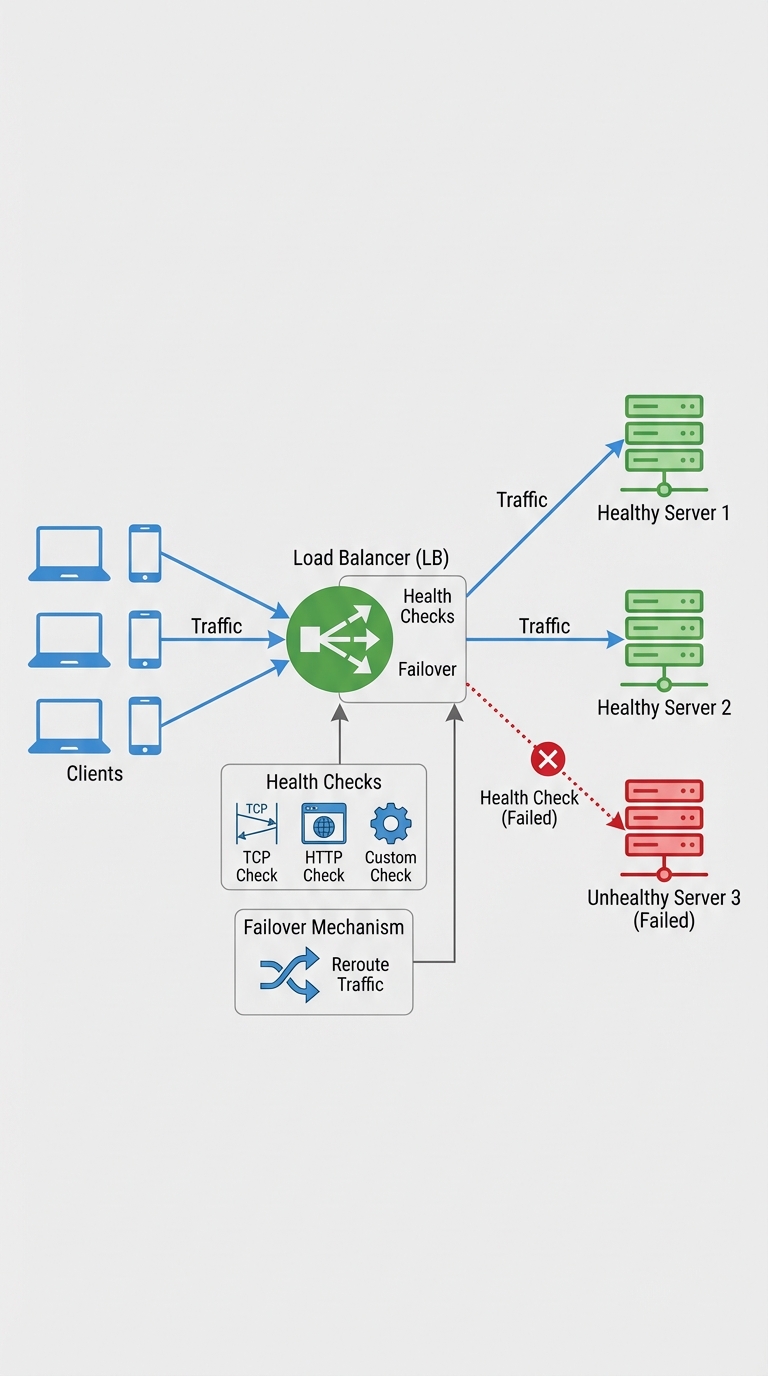
A load balancer keeps service availability high by routing traffic only to healthy servers. Health checks detect unhealthy instances; failover is what happens next — traffic is routed away from them.
What is a health check?
A health check is a periodic probe that verifies whether a backend instance can accept requests. Common forms:
- TCP: attempt to open a TCP connection on a port. Fast and simple.
- HTTP(S): request a URL (e.g., /healthz) and expect a 200 OK. Can check application-level readiness.
- Custom: run a script or call an internal API for richer validation (DB connectivity, caches warmed, etc.).
Health checks can be active (LB polls backends) or passive (LB learns from real request failures). Many systems combine both.
How health checks work (practical details)
- Frequency: how often the LB probes (e.g., every 5s).
- Timeout: how long the LB waits for a response before considering the probe failed.
- Thresholds: number of consecutive failures to mark unhealthy and consecutive successes to mark healthy again.
- Endpoint design: use a light-weight, local check (e.g., /healthz) that returns clear status codes and is safe to call frequently.
Example: mark unhealthy after 3 failed probes with 2s timeout; mark healthy after 2 successful probes.
What happens on failure: failover
Failover is the rerouting of traffic away from unhealthy instances to healthy ones. Patterns include:
- Active–Passive: a standby pool takes all traffic when primaries fail.
- Active–Active: multiple pools share traffic; unhealthy nodes are simply removed.
- DNS failover: change DNS records (slower, dependent on TTL).
- Weighted or priority routing: shift traffic according to weight or priority groups.
Important behaviors:
- Immediate removal from rotation prevents new requests reaching failed nodes.
- Connection draining (graceful shutdown): allow existing connections to finish rather than drop them.
- Session persistence/sticky sessions: if used, failover needs a plan for session continuity (replicate session state or avoid sticky sessions).
Design considerations & best practices
- Health endpoint content: keep it cheap and local. Avoid expensive or global checks in frequent probes.
- Differentiate readiness vs liveness:
- Readiness: is this instance ready to receive traffic? (used by LBs)
- Liveness: is the process alive or should it be restarted? (used by orchestrators)
- Use conservative thresholds for flapping prevention: require several consecutive failures before removing an instance.
- Backoff and circuit breaking: when a backend keeps failing, reduce retries and escalate alerts.
- Connection draining: on removal, stop new connections but allow existing ones to complete (with a timeout).
- Slow-start/warm-up: when adding capacity, ramp traffic up to avoid overwhelming cold caches.
- Monitoring & alerting: treat health check failures as an operational signal — integrate with dashboards and alerts.
- Security: ensure health endpoints don't leak sensitive data; restrict access if necessary.
How this appears in interviews
Interviewers expect you to mention:
- Types of checks (TCP/HTTP/custom)
- Readiness vs liveness
- Thresholds, timeouts, and retries
- Connection draining and session handling
- How failover routes traffic (active/active vs active/passive)
- How autoscaling and health checks interact
A concise interview answer: "Load balancers poll backends using TCP/HTTP/custom probes. If an instance times out or returns errors beyond configured thresholds, it's marked unhealthy and removed. Failover reroutes traffic to healthy instances; when the instance passes checks again it rejoins. Use connection draining, conservative thresholds, and separate readiness/liveness checks to avoid flapping and dropped requests."
Testing failures & resilience
- Chaos engineering: inject failures to validate failover paths.
- Fire drills: simulate instance failures and verify end-to-end behavior.
- Load tests: ensure the healthy pool can absorb redirected traffic.
Quick checklist for interviews
- Define types of checks you'll use
- Specify frequency, timeout, and thresholds
- Explain draining behavior and session handling
- Mention monitoring, alerts, and chaos testing
Design for failure — assume nodes will die. If you can describe how health checks detect issues and how failover reroutes traffic safely, you’ll cover the essentials interviewers want to hear.
About the author
bugfree.ai is an advanced AI-powered platform designed to help software engineers master system design and behavioral interviews. Whether you’re preparing for your first interview or aiming to elevate your skills, bugfree.ai provides a robust toolkit tailored to your needs. Key Features:
150+ system design questions: Master challenges across all difficulty levels and problem types, including 30+ object-oriented design and 20+ machine learning design problems. Targeted practice: Sharpen your skills with focused exercises tailored to real-world interview scenarios. In-depth feedback: Get instant, detailed evaluations to refine your approach and level up your solutions. Expert guidance: Dive deep into walkthroughs of all system design solutions like design Twitter, TinyURL, and task schedulers. Learning materials: Access comprehensive guides, cheat sheets, and tutorials to deepen your understanding of system design concepts, from beginner to advanced. AI-powered mock interview: Practice in a realistic interview setting with AI-driven feedback to identify your strengths and areas for improvement.
bugfree.ai goes beyond traditional interview prep tools by combining a vast question library, detailed feedback, and interactive AI simulations. It’s the perfect platform to build confidence, hone your skills, and stand out in today’s competitive job market. Suitable for:
New graduates looking to crack their first system design interview. Experienced engineers seeking advanced practice and fine-tuning of skills. Career changers transitioning into technical roles with a need for structured learning and preparation.
Comments
Join the discussionNo comments yet. Be the first to comment.


