
Email vs SMS vs In‑App: Pick the Right Notification Channel (Interview-Ready)
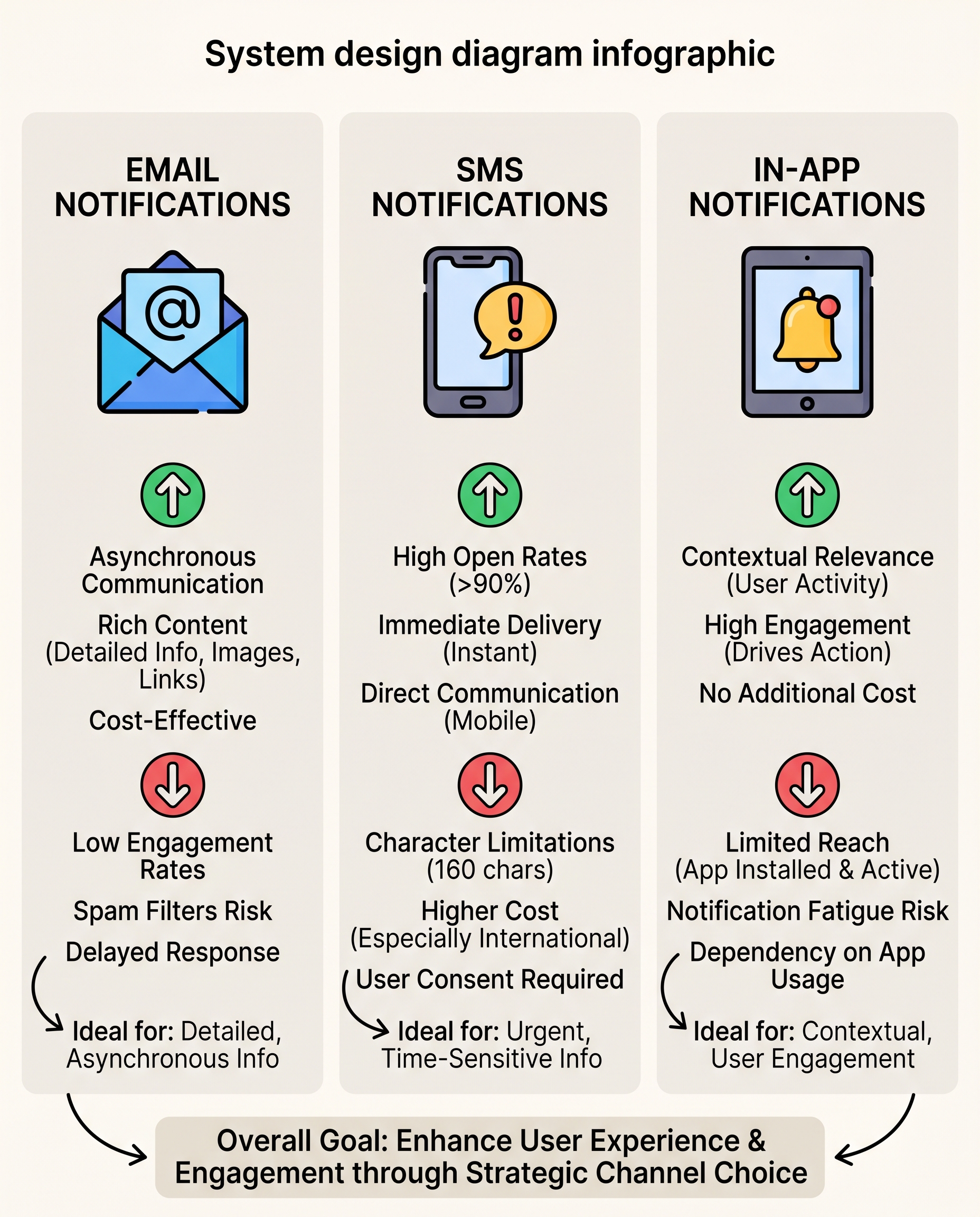
In system design, "notifications" is not a single feature—it's a channel decision. The right channel depends on message intent, timing, cost, and user state. Below is a concise, interview-ready guide to choose between Email, SMS, and In‑App notifications, plus the technical tradeoffs you should mention during system-design conversations.
The simple rule
- Email = depth
- SMS = urgency
- In‑App = context
Use this as a starting heuristic and back it up with metrics and constraints when asked in an interview.
Channel breakdown (what they're best for and weaknesses)
- Best for: rich, detailed, asynchronous messages (receipts, newsletters, onboarding flows).
- Strengths: low cost, supports long-form content, templating, rich HTML, attachments.
- Weaknesses: low open rates, spam filtering/deliverability issues, slower response time.
- Notes: good for audit trails and record-keeping.
SMS
- Best for: urgent, time-sensitive alerts (OTP, outages, critical alerts) where you need immediate attention.
- Strengths: very high open rates and fast reads.
- Weaknesses: 160-character limit (or higher cost for concatenated messages), higher per-message cost, strict opt-in and compliance (TCPA, etc.).
- Notes: use sparingly—users expect high signal-to-noise.
In‑App
- Best for: contextual prompts that drive action inside the product (feature nudges, promotions while user is active).
- Strengths: highly relevant, can be interactive, low cost to deliver to active users.
- Weaknesses: only reaches active users; overuse causes notification fatigue and churn.
- Notes: combine with UI hooks (badges, modals) and deep links to increase conversions.
Decision matrix (quick guide)
- Need details and record -> Email
- Need immediate attention -> SMS
- User is in the product and you want action -> In‑App
Also consider fallback flows: e.g., try in‑app for active users, email for non-active users, and SMS for escalations/critical alerts.
Interview-ready talking points (short script)
"I’d select channels based on intent and user state: use in‑app for contextual, real-time product prompts; email for rich or legal communications and batched updates; and SMS for urgent, attention‑critical alerts. I’d implement a fallback policy—in‑app first if the user is online, otherwise email, and escalate to SMS only for critical notifications. Key tradeoffs include cost, deliverability, opt‑in/compliance, and notification fatigue."
Technical/system-design considerations to mention
- Delivery guarantees: best-effort vs at-least-once for critical alerts; idempotency keys and deduplication.
- Scalability: fanout, sharding, batching (email providers like SES handle bulk, but your queue/backpressure matters).
- Rate limits & throttling: provider limits for SMS/email; backoff strategies.
- Provider selection & SLA: multi-provider failover for geo-redundancy and higher deliverability.
- Templates & personalization: dynamic templating, locale/timezone rendering, and A/B testing.
- Compliance & opt-in: GDPR, CAN-SPAM, TCPA—store consent and support unsubscribe/Do Not Disturb.
- Cost tracking: attribute cost per notification to features, especially for SMS.
- Observability: delivery rates, bounce, open/click metrics, latency, error rates.
- Security: redact PII in logs, rotate API keys, sign webhooks for delivery receipts.
Practical examples
- OTP login: SMS (or push) for immediacy; fallback to email if SMS fails and the account allows.
- Weekly digest: Email—batch and personalize.
- New message alert: In‑App badge + optional push/SMS for unread critical messages.
- Outage notification for admins: SMS + email + in‑app; mark as critical so escalation is allowed.
Best practices
- Establish a channel policy: when to use each channel and when to escalate.
- Respect frequency limits and user preferences; let users set channels for each category.
- Instrument everything: track opens, clicks, deliveries, and user actions stemming from notifications.
- Use progressive enhancement: in‑app → email → SMS for non-response on critical flows.
- Test deliverability: monitor spam rates and provider health.
Closing (for interviews)
When answering interview questions, state the heuristic (depth vs urgency vs context), describe a concrete fallback flow, and call out at least three technical tradeoffs (cost, deliverability, compliance). If asked for architecture, sketch: producers → notification service (categorize + templates + user prefs) → channel adapters → provider(s) with retries, backoff, metrics, and multi-provider failover.
#SystemDesign #SoftwareEngineering #TechInterviews
About the author
bugfree.ai is an advanced AI-powered platform designed to help software engineers master system design and behavioral interviews. Whether you’re preparing for your first interview or aiming to elevate your skills, bugfree.ai provides a robust toolkit tailored to your needs. Key Features:
150+ system design questions: Master challenges across all difficulty levels and problem types, including 30+ object-oriented design and 20+ machine learning design problems. Targeted practice: Sharpen your skills with focused exercises tailored to real-world interview scenarios. In-depth feedback: Get instant, detailed evaluations to refine your approach and level up your solutions. Expert guidance: Dive deep into walkthroughs of all system design solutions like design Twitter, TinyURL, and task schedulers. Learning materials: Access comprehensive guides, cheat sheets, and tutorials to deepen your understanding of system design concepts, from beginner to advanced. AI-powered mock interview: Practice in a realistic interview setting with AI-driven feedback to identify your strengths and areas for improvement.
bugfree.ai goes beyond traditional interview prep tools by combining a vast question library, detailed feedback, and interactive AI simulations. It’s the perfect platform to build confidence, hone your skills, and stand out in today’s competitive job market. Suitable for:
New graduates looking to crack their first system design interview. Experienced engineers seeking advanced practice and fine-tuning of skills. Career changers transitioning into technical roles with a need for structured learning and preparation.
Comments
Join the discussionNo comments yet. Be the first to comment.


