
Email vs SMS vs In‑App: Pick the Right Notification Channel (Interview-Ready)
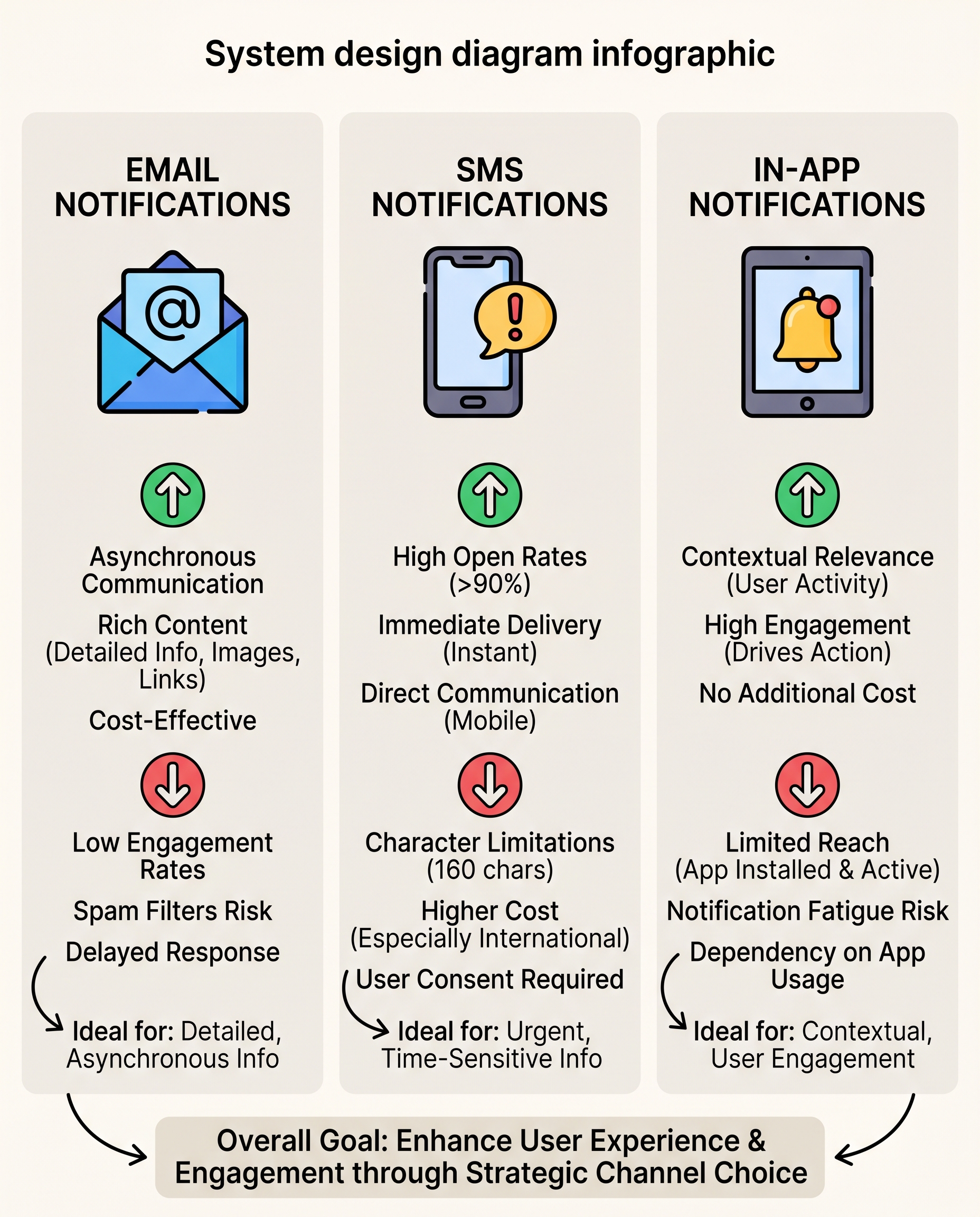
In system design, “notifications” isn’t a single feature — it’s a choice of channel. Each channel serves a different user need and has unique trade-offs. Picking the right one improves engagement, reduces costs, and avoids annoying users.
Quick rule of thumb:
- Email = depth
- SMS = urgency
- In‑app = context
When to use each channel
Email
- Best for: Rich, detailed, asynchronous messages (receipts, newsletters, weekly digests, onboarding flows).
- Strengths: Low cost, supports long content/HTML, persistent in the user’s inbox.
- Weaknesses: Low open rates, spam filters, slower response times, deliverability complexity (SPF/DKIM/DMARC).
SMS
- Best for: Urgent, time‑sensitive alerts (2FA, delivery updates, payment failures, safety/critical alerts).
- Strengths: Extremely high open rates and fast reads.
- Weaknesses: Tight character limits (~160 chars), higher cost per message, strict opt‑in/opt‑out requirements and carrier regulations.
In‑App
- Best for: Contextual prompts that drive immediate action inside your product (feature nudges, guided tours, contextual warnings).
- Strengths: Rich interactions, actionable (deep links), no per-message carrier cost.
- Weaknesses: Only reaches active users; overuse causes fatigue and churn.
Decision checklist (interview-ready)
When asked which channel to use, walk the interviewer through this checklist:
- Is this message time‑sensitive? If yes → SMS.
- Does it require long content or formal record? If yes → Email.
- Will the user be in your app and expected to act immediately? If yes → In‑App.
- Cost sensitivity? If high → prefer Email/In‑App over SMS.
- Compliance or legal requirements? Follow opt‑in/opt‑out and data rules (SMS carriers, GDPR, TCPA).
Give a succinct answer: "Use SMS for urgency, Email for depth and persistence, In‑App for contextual, actionable prompts." Then justify with trade-offs above.
Implementation considerations (system design notes)
- Architecture pattern:
- Notification API → Routing service → Channel adapters (SMTP, SMS provider, in‑app push) → Delivery workers → Retry & DLQ → Analytics/metrics.
- Routing logic: user preferences, channel priority, throttling, blackouts (do not disturb), business rules, locale/timezone.
- Deliverability & compliance:
- Email: SPF/DKIM/DMARC, reputation monitoring, bounce handling, unsubscribe links.
- SMS: Provider selection, opt‑in logs, message templates, concats vs multipart handling, carrier rate limits.
- In‑app: Local persistence, offline delivery, badge/notification UX, session-based display.
- Fallbacks: define fallbacks (e.g., push or in‑app first, fallback to email for critical items; SMS for immediate OTPs if push fails).
- Analytics: track sends, deliveries, opens/clicks (email), impressions/clicks (in‑app), delivery confirmations (SMS). Use these to refine channel choice.
- Throttling & user safety: per-user caps, exponential backoff, and suppression lists to avoid fatigue and abuse.
Interview example — short answer + architecture sketch
Question: "How would you design a notification system and choose channels?"
Answer (concise): "I’d build a routing service that uses business rules and user preferences to choose a channel: SMS for urgent time‑sensitive items, Email for detailed or legal communications, and In‑App for contextual product actions. Each channel has its own adapter for delivery, a retry/DLQ strategy, and analytics. I’d also implement throttles, user preferences, and fallback channels to ensure reliability and avoid over‑notification."
Architecture sketch (high level):
- Client (web/mobile) ↔ App Server → Notification Service
- Notification Service:
- Policy & Preference Engine
- Router → Queue(s)
- Workers: Email Adapter (SMTP/SES), SMS Adapter (Twilio/Carrier), In‑App Adapter (push + local storage)
- Monitoring & Analytics
Practical tips
- Always honor user preferences and global do‑not‑disturb windows.
- Use templates and personalization tokens to improve relevance (and deliverability).
- Centralize unsubscribe/unsubscribe handling across channels where applicable.
- Measure and iterate: A/B test channel mixes and timings.
Summary
- Email for depth and persistence; cheaper but slower.
- SMS for urgency and immediacy; reliable attention but costly and regulated.
- In‑app for contextual, actionable messages; great for active users but limited reach.
One‑line rule to use in interviews: Email = depth, SMS = urgency, In‑App = context.
#SystemDesign #SoftwareEngineering #TechInterviews
About the author
bugfree.ai is an advanced AI-powered platform designed to help software engineers master system design and behavioral interviews. Whether you’re preparing for your first interview or aiming to elevate your skills, bugfree.ai provides a robust toolkit tailored to your needs. Key Features:
150+ system design questions: Master challenges across all difficulty levels and problem types, including 30+ object-oriented design and 20+ machine learning design problems. Targeted practice: Sharpen your skills with focused exercises tailored to real-world interview scenarios. In-depth feedback: Get instant, detailed evaluations to refine your approach and level up your solutions. Expert guidance: Dive deep into walkthroughs of all system design solutions like design Twitter, TinyURL, and task schedulers. Learning materials: Access comprehensive guides, cheat sheets, and tutorials to deepen your understanding of system design concepts, from beginner to advanced. AI-powered mock interview: Practice in a realistic interview setting with AI-driven feedback to identify your strengths and areas for improvement.
bugfree.ai goes beyond traditional interview prep tools by combining a vast question library, detailed feedback, and interactive AI simulations. It’s the perfect platform to build confidence, hone your skills, and stand out in today’s competitive job market. Suitable for:
New graduates looking to crack their first system design interview. Experienced engineers seeking advanced practice and fine-tuning of skills. Career changers transitioning into technical roles with a need for structured learning and preparation.
Comments
Join the discussionNo comments yet. Be the first to comment.


