
Class Diagrams in Interviews: Draw Less, Explain More
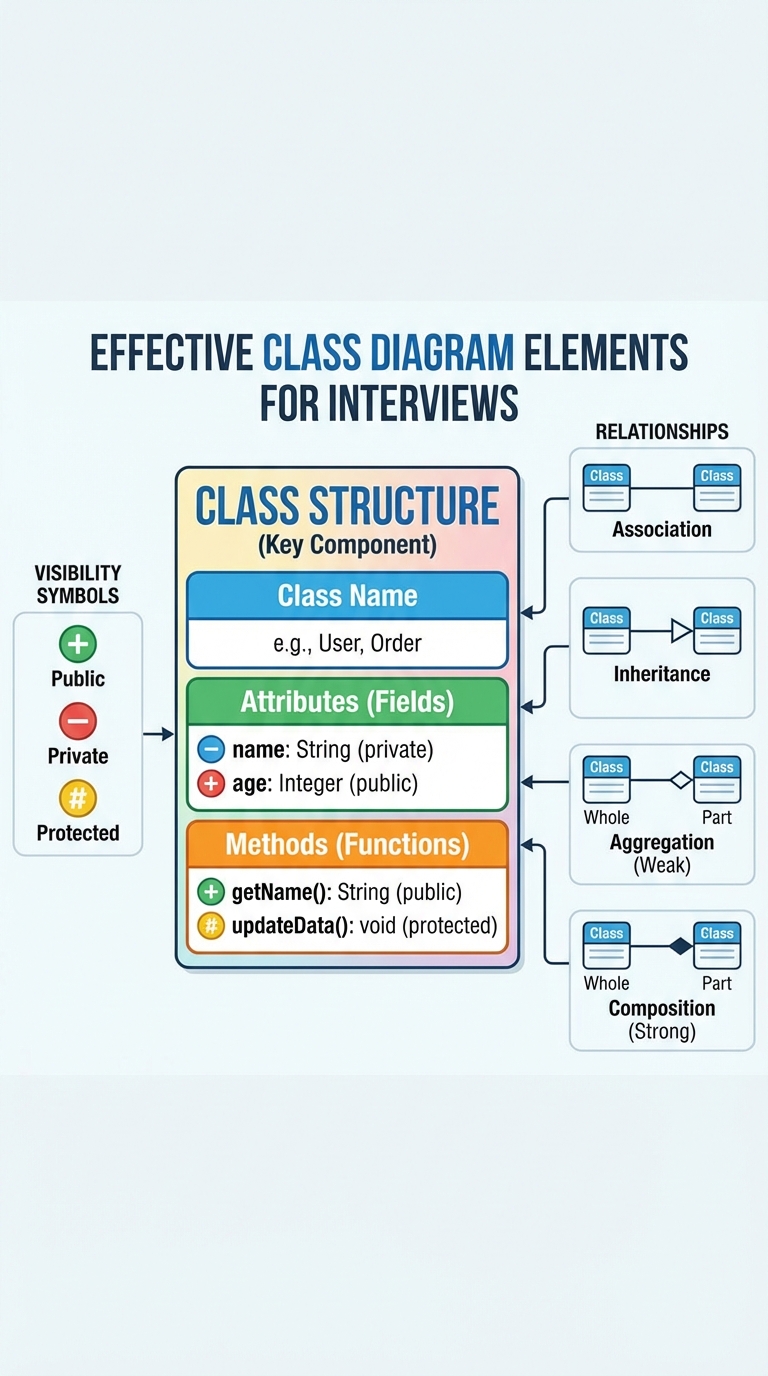
In object-oriented design (OOD) interviews, your class diagram isn't a final spec — it's your thinking on paper. The goal is to communicate intent quickly and clearly, not to model every implementation detail. Below is a compact approach to sketch sharp, interview-ready class diagrams and explain them confidently.
What to show (and why)
- Core classes: include only classes that capture major responsibilities. For each, show:
- Name (clear, noun)
- A few key attributes (state that matters for behavior)
- Key methods (behavior that drives interactions)
- Relationships: make these explicit and meaningful — association, inheritance, aggregation, composition. Label roles if it helps.
- Visibility: use + (public), - (private), # (protected) to show intent, not to clutter the diagram.
Why this matters: interviewers want to see how you structure responsibilities, reason about coupling/cohesion, and make trade-offs. A concise diagram that highlights the key decisions is far more effective than a noisy, complete model.
Quick guide to relationships
- Association: one class knows about another (e.g., Order -> Customer).
- Aggregation: a loose whole/part (e.g., Catalog contains Products but Products can exist independently).
- Composition: strong lifecycle ownership (e.g., Order has OrderLineItems — when Order is deleted, lines go too).
- Inheritance: use when there's a clear "is-a" relationship and shared behavior or interface.
Use these deliberately. When in doubt, prefer composition/association over inheritance.
How to present it in an interview (script)
- State the scope: what you're modeling and what you're excluding.
- Identify responsibilities: list the core nouns (candidates for classes).
- Draw class boxes with only the essential attributes/methods.
- Add relationships that drive the design and annotate why.
- Walk through an example flow (e.g., sequence: CreateOrder -> AddItem -> Checkout) to show interaction.
- Discuss alternatives and trade-offs (e.g., "I could use inheritance here, but composition reduces coupling") and potential refinements.
This weakens the need to draw every detail — you explain intent and trade-offs instead.
Practical tips
- Prioritize clarity over completeness: highlight the few relationships that drive the design.
- Use visibility to show intent (public vs private) but don’t list every getter/setter.
- Iteratively refine the diagram as you reason; cross out and adjust — interviewers appreciate iterative thinking.
- Practice on common domains: library systems, e-commerce carts, social apps. Keep examples small enough to finish in 5–7 minutes.
Example prompts to practice
- Library: Book, Member, Loan — show Loan composition with Book and Member.
- E-commerce: Cart, Product, CartItem, Order — show CartItem as composition inside Cart; Order aggregates Cart data.
- Social app: User, Post, Comment, Notification — show associations and ownership (Post owns Comments).
Quick checklist before you finish
- Did I name the core classes? Yes/no
- Did I show the relationships that affect behavior? Yes/no
- Can I explain one trade-off I made? Yes/no
- Is the diagram small enough to redraw quickly if asked? Yes/no
Keep your diagram focused: draw less, explain more, and let the interviewer follow your reasoning.
#SystemDesign #ObjectOrientedDesign #SoftwareEngineering
About the author
bugfree.ai is an advanced AI-powered platform designed to help software engineers master system design and behavioral interviews. Whether you’re preparing for your first interview or aiming to elevate your skills, bugfree.ai provides a robust toolkit tailored to your needs. Key Features:
150+ system design questions: Master challenges across all difficulty levels and problem types, including 30+ object-oriented design and 20+ machine learning design problems. Targeted practice: Sharpen your skills with focused exercises tailored to real-world interview scenarios. In-depth feedback: Get instant, detailed evaluations to refine your approach and level up your solutions. Expert guidance: Dive deep into walkthroughs of all system design solutions like design Twitter, TinyURL, and task schedulers. Learning materials: Access comprehensive guides, cheat sheets, and tutorials to deepen your understanding of system design concepts, from beginner to advanced. AI-powered mock interview: Practice in a realistic interview setting with AI-driven feedback to identify your strengths and areas for improvement.
bugfree.ai goes beyond traditional interview prep tools by combining a vast question library, detailed feedback, and interactive AI simulations. It’s the perfect platform to build confidence, hone your skills, and stand out in today’s competitive job market. Suitable for:
New graduates looking to crack their first system design interview. Experienced engineers seeking advanced practice and fine-tuning of skills. Career changers transitioning into technical roles with a need for structured learning and preparation.
Comments
Join the discussionNo comments yet. Be the first to comment.


