
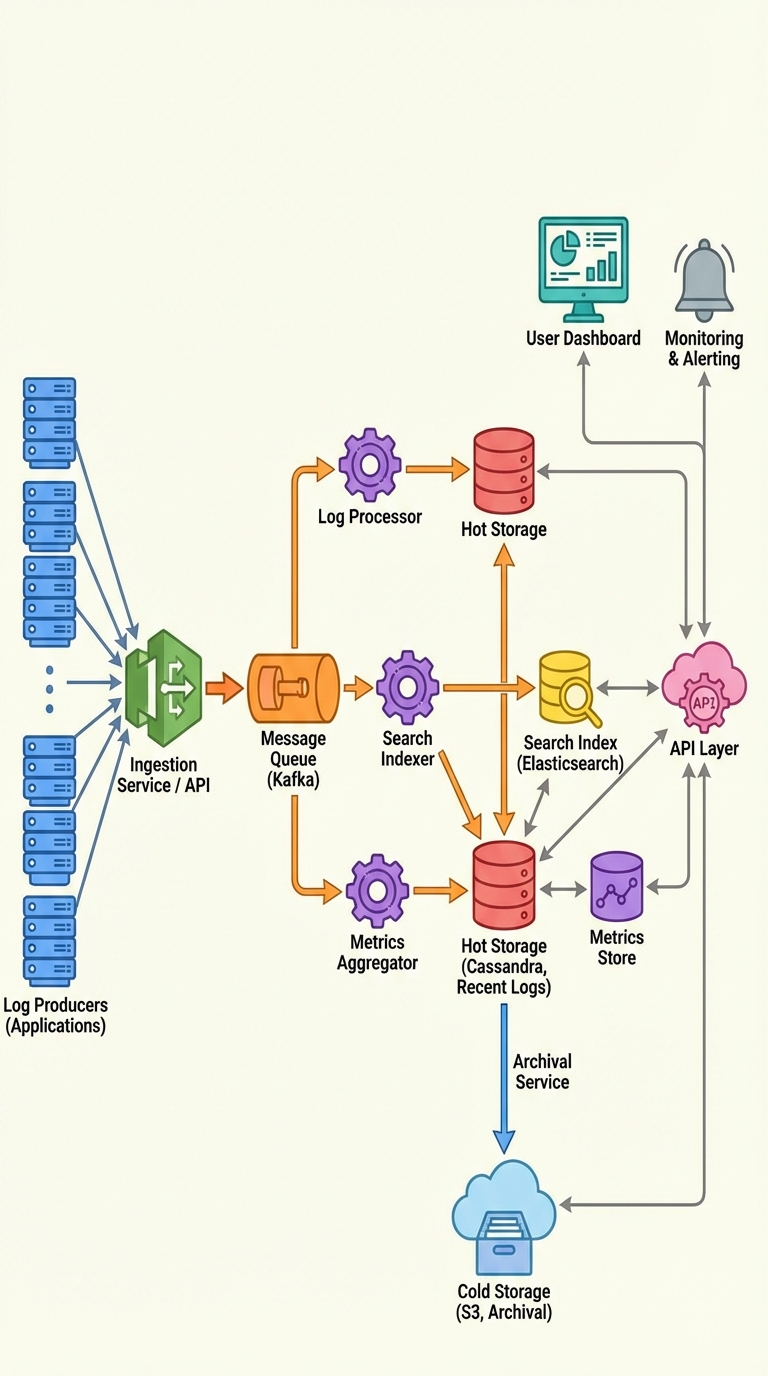
The One Partitioning Trick That Makes Log Queries Fast (and Your Cassandra Schema Interview-Ready)
When you store logs in Cassandra, the primary key is your performance contract. Get the partitioning wrong and reads or writes will suffer. A common mistake is partitioning by the raw timestamp — that creates many tiny partitions and forces scattered reads across the cluster.
The simple, high-impact trick: partition by (service_id, time_bucket) and cluster by log_timestamp.
- Partition key: (service_id, time_bucket) — a time-bucketed value (hourly, daily, etc.)
- Clustering column: log_timestamp (usually DESC to read recent logs first)
This pattern keeps writes sequential, avoids hot partitions, and makes "service + time range" queries usually scan one or a few partitions instead of every node.
Why this works
- Sequential writes: all logs for a service within a time bucket land in the same partition so writes append rather than scatter.
- Avoid hot partitions: time buckets bound partition growth; you won’t blow up a single partition across all time.
- Efficient queries: queries like "logs for service X between T1 and T2" typically touch one or a small number of partitions (a single partition if the range fits in one bucket).
Example table and queries
CREATE TABLE logs_by_service (
  service_id text,
  time_bucket bigint,        -- e.g. epoch hour or day
  log_timestamp timestamp,
  log_level text,
  message text,
  PRIMARY KEY ((service_id, time_bucket), log_timestamp)
) WITH CLUSTERING ORDER BY (log_timestamp DESC);
Query recent logs for a single bucket:
SELECT *
FROM logs_by_service
WHERE service_id = 'auth-service'
  AND time_bucket = 20260104_10
  AND log_timestamp >= '2026-01-04 10:00'
  AND log_timestamp <= '2026-01-04 10:59';
For a time range spanning multiple buckets, you query multiple time_bucket values (fan-out):
SELECT *
FROM logs_by_service
WHERE service_id = 'auth-service'
  AND time_bucket IN (20260104_08, 20260104_09, 20260104_10)
  AND log_timestamp >= '2026-01-04 08:15'
  AND log_timestamp <= '2026-01-04 10:30';
How to choose a bucket size
This is the trade-off: smaller buckets -> smaller partitions, but more buckets to query (more fan-out). Larger buckets -> fewer partition reads but larger partitions and higher risk of hotspots.
A practical approach:
- Estimate writes per service per time unit (rows/sec or rows/hour).
- Choose a bucket so partitions stay manageable (many teams aim for partitions in the low‑MBs to tens of MBs, not hundreds of MBs). Avoid designs that create millions of rows in one partition.
- If query patterns usually ask for short recent ranges, use smaller buckets (hourly). If queries commonly span longer windows and write volume is moderate, daily buckets may be fine.
- Monitor partition size and read latency and iterate.
Interview-ready phrasing
Say something like:
"For log data in Cassandra, partition by (service_id, time_bucket) — e.g., hourly — and cluster by log_timestamp. That keeps writes sequential, prevents hotspots, and makes service+time-range queries a single-partition scan. Choose a bucket size that balances partition size against query fan-out given your write volume and query patterns."
That statement highlights the pattern, the benefits, and the trade-off in a single, clear sentence.
Extra tips
- Use clustering order DESC if you typically query recent logs.
- TTL per bucket or compaction strategy matters for retention-heavy workloads.
- Instrument partition sizes and query fan-out in production; real traffic will guide bucket-sizing decisions.
This one partitioning trick is simple to explain in interviews and effective in production: bucket time in the partition key, cluster by timestamp, and choose the bucket size to balance partition size and query fan-out.
About the author
bugfree.ai is an advanced AI-powered platform designed to help software engineers master system design and behavioral interviews. Whether you’re preparing for your first interview or aiming to elevate your skills, bugfree.ai provides a robust toolkit tailored to your needs. Key Features:
150+ system design questions: Master challenges across all difficulty levels and problem types, including 30+ object-oriented design and 20+ machine learning design problems. Targeted practice: Sharpen your skills with focused exercises tailored to real-world interview scenarios. In-depth feedback: Get instant, detailed evaluations to refine your approach and level up your solutions. Expert guidance: Dive deep into walkthroughs of all system design solutions like design Twitter, TinyURL, and task schedulers. Learning materials: Access comprehensive guides, cheat sheets, and tutorials to deepen your understanding of system design concepts, from beginner to advanced. AI-powered mock interview: Practice in a realistic interview setting with AI-driven feedback to identify your strengths and areas for improvement.
bugfree.ai goes beyond traditional interview prep tools by combining a vast question library, detailed feedback, and interactive AI simulations. It’s the perfect platform to build confidence, hone your skills, and stand out in today’s competitive job market. Suitable for:
New graduates looking to crack their first system design interview. Experienced engineers seeking advanced practice and fine-tuning of skills. Career changers transitioning into technical roles with a need for structured learning and preparation.
Comments
Join the discussionNo comments yet. Be the first to comment.


