
API Pagination & Filtering: The Interview-Ready Design Choices
If your API serves large datasets, pagination and filtering are not optional niceties — they are critical performance controls and UX primitives. Below is a concise, interview-friendly guide to the trade-offs, best practices, and example request/response shapes you should be able to explain and design on the spot.
Why this matters
- Large result sets can overwhelm memory, bandwidth, and clients. Pagination bounds the work per request.
- Filtering reduces dataset size on the server and allows users to find relevant items.
- Proper choices determine scalability, correctness (no missing or duplicate items), and developer experience.
Pagination strategies
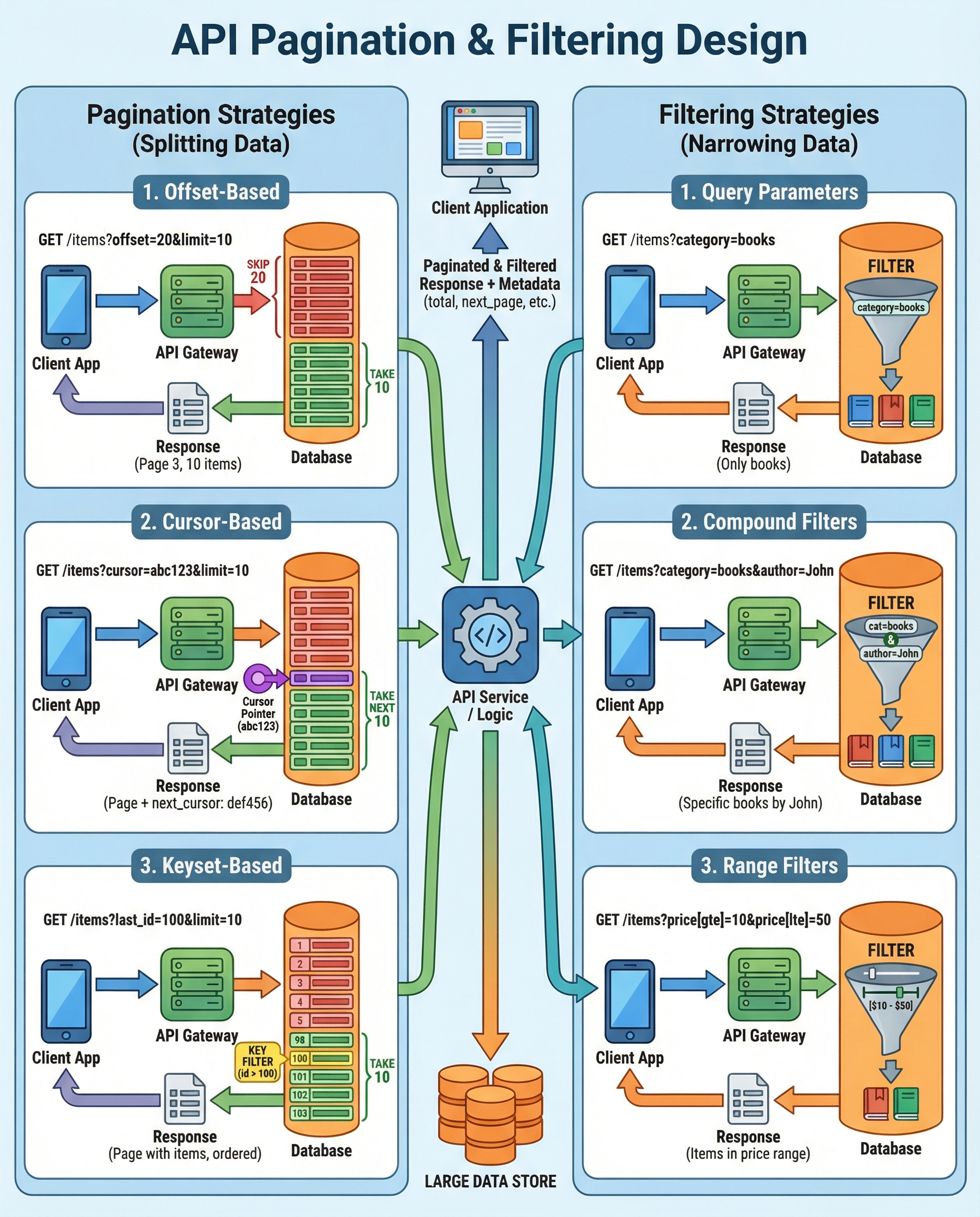
Offset / Limit
- API shape:
GET /items?offset=1000&limit=50or?page=21&per_page=50. - Pros: simple to understand and implement.
- Cons: performance degrades as offset increases (DB must scan/skipped rows), and results can be inconsistent if the underlying data changes during pagination.
- Use when: dataset is small-to-medium, or the UX requires jumping to arbitrary pages (e.g., classic paginated tables).
Example SQL (offset):
SELECT * FROM items
ORDER BY created_at DESC, id DESC
LIMIT 50 OFFSET 1000;
Cursor / Keyset (Recommended at scale)
- API shape:
GET /items?cursor=eyJpZCI6MTAwLCJ0IjoiMjAyNi0wMi0xNiJ9&limit=50or?after=2026-02-16T00:00:00Z_100. - Use a stable sort key (e.g., created_at + id) and return a cursor representing the last row seen.
- Pros: consistent, fast at scale (uses index seeks, not large skips), safer under concurrent writes.
- Cons: slightly more complex; not ideal for jumping to arbitrary pages by number.
- Important: cursor must encode the sort columns (e.g., timestamp and id) to avoid duplication or missing rows when data changes.
Example keyset SQL:
-- Assuming we sort by created_at DESC, id DESC
SELECT * FROM items
WHERE (created_at, id) < ('2026-02-16T00:00:00', 100)
ORDER BY created_at DESC, id DESC
LIMIT 50;
Cursor payload (opaque base64 JSON):
{ "created_at": "2026-02-16T00:00:00Z", "id": 100 }
Filtering best practices
- Use clear, REST-friendly query params:
?category=clothing&price_min=10&price_max=100. - Support range operators and consistent naming:
created_at[gte]=2026-01-01&created_at[lte]=2026-01-31orcreated_after/created_beforedepending on your style guide. - Allow compound filters: multiple params combined with AND semantics by default. Consider special syntax for OR/NOT where needed (but keep it explicit).
- Index accordingly: every field commonly used in filters should be indexed. For multi-column filters, consider composite indexes that match the query's ordering and equality/range pattern.
- Be explicit about filter semantics and types in docs (strings, enums, numerics, date format/timezones).
Example filters:
GET /orders?status=shipped&total_min=50&created_at[gte]=2026-01-01
Indexing notes:
- Equality filters: single-column index helps.
- Range filters: index can help, but evaluate selectivity.
- Composite indexes: create them following the usual rule—columns used in equality first, then range.
Rules & response metadata (what to always include)
- Enforce a max limit (e.g., max_limit = 100). Provide a sensible default (e.g., 25 or 50).
- Return pagination metadata so clients can continue paging or render UI correctly. Typical fields:
next_cursor(opaque string) ornext_page(URL). For offset,pageandper_pageornext_pageworks.has_moreorhas_next(boolean) to quickly indicate if more data exists.total_count(optional, expensive) orestimated_count(if you maintain approximate counts).page,per_pageorlimit,offsetwhen using offset pagination.
Example cursor-based response:
{
  "data": [ /* items */ ],
  "pagination": {
    "next_cursor": "eyJjcmVhdGVkX2F0IjoiMjAyNi0wMi0xNiIsICJpZCI6MTAwfQ==",
    "has_more": true,
    "limit": 50
  }
}
Example offset-based response:
{
  "data": [ /* items */ ],
  "page": 3,
  "per_page": 50,
  "total_count": 1245
}
Practical interview talking points & pitfalls
- When asked to choose: prefer keyset for large, frequently-changing datasets; offset is OK for small datasets or where random-access to pages is required.
- Ensure deterministic sort order (tie-break by unique id) for both offset and keyset.
- For keyset, encode multiple sort columns in the cursor (timestamp + id) so you can avoid duplicates/missing items when rows are inserted/removed.
- Rate-limit and cap
limitto avoid clients requesting huge pages. - Document example requests and responses in your API docs so consumers know how to paginate and filter correctly.
- If you need counts, comment on cost:
COUNT(*)can be slow—consider cached/approximate counts or background jobs to maintain totals.
Quick cheat-sheet
- Use offset/limit: simple, occasional use, or UI needs direct page jumps.
- Use cursor/keyset: high-perf, consistent, scalable for infinite-scroll and large tables.
- Always: cap max limit, return next cursor/has_more/page info, index filter columns, document examples.
If you'd like, I can generate ready-to-paste OpenAPI examples for both offset and cursor pagination, with filter parameter schemas and sample responses.
About the author
bugfree.ai is an advanced AI-powered platform designed to help software engineers master system design and behavioral interviews. Whether you’re preparing for your first interview or aiming to elevate your skills, bugfree.ai provides a robust toolkit tailored to your needs. Key Features:
150+ system design questions: Master challenges across all difficulty levels and problem types, including 30+ object-oriented design and 20+ machine learning design problems. Targeted practice: Sharpen your skills with focused exercises tailored to real-world interview scenarios. In-depth feedback: Get instant, detailed evaluations to refine your approach and level up your solutions. Expert guidance: Dive deep into walkthroughs of all system design solutions like design Twitter, TinyURL, and task schedulers. Learning materials: Access comprehensive guides, cheat sheets, and tutorials to deepen your understanding of system design concepts, from beginner to advanced. AI-powered mock interview: Practice in a realistic interview setting with AI-driven feedback to identify your strengths and areas for improvement.
bugfree.ai goes beyond traditional interview prep tools by combining a vast question library, detailed feedback, and interactive AI simulations. It’s the perfect platform to build confidence, hone your skills, and stand out in today’s competitive job market. Suitable for:
New graduates looking to crack their first system design interview. Experienced engineers seeking advanced practice and fine-tuning of skills. Career changers transitioning into technical roles with a need for structured learning and preparation.
Comments
Join the discussionNo comments yet. Be the first to comment.


